Blocks Square Blaster Review: Shaped Holes on a 5x5 Grid
A Blocks Square Blaster review: fill a 5x5 grid with one-color pieces whose circle and square holes must sit over matching icons.
Game at a glance
Blocks Square Blaster
7/ 10
Our score
Block puzzle with a target: solve the board instead of clearing just to clear.
In this article6 sections
Late in Level 3 of Blocks Square Blaster, four cells of the 5x5 board are still empty, with a blue circle icon showing in the gap, and the word “IMPRESSIVE!” is stamped across the grid. One blue piece is left in the tray. It fills the gap exactly, and the results screen follows: three gold stars over “COMPLETED!”, with the time under the level label reading 00m 38s.
That full board is the whole aim. This mobile entry among block puzzle games gives the player a tray of one-color pieces with circle or square holes cut into them. Each hole has to land on a printed icon of the same shape and color, and the level ends when the grid is covered. The game still falls in the bite-sized hyper-casual camp, yet each board becomes a small puzzle with a clear finish.
Circle and Square Holes Over Matching Icons
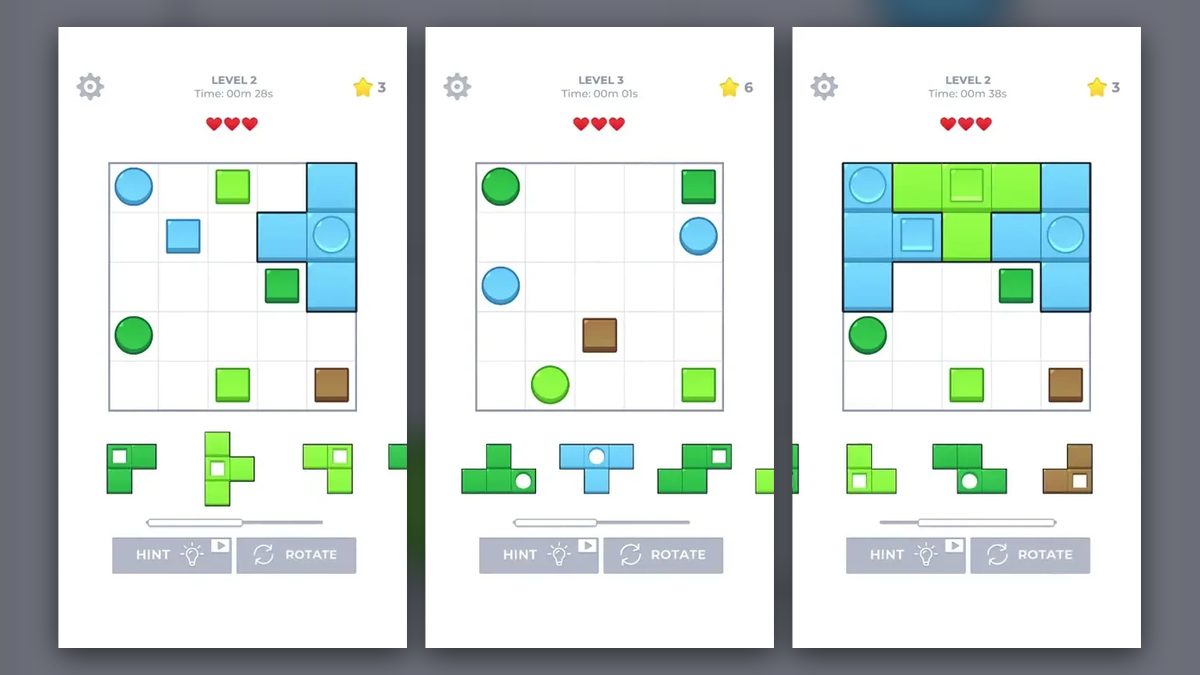
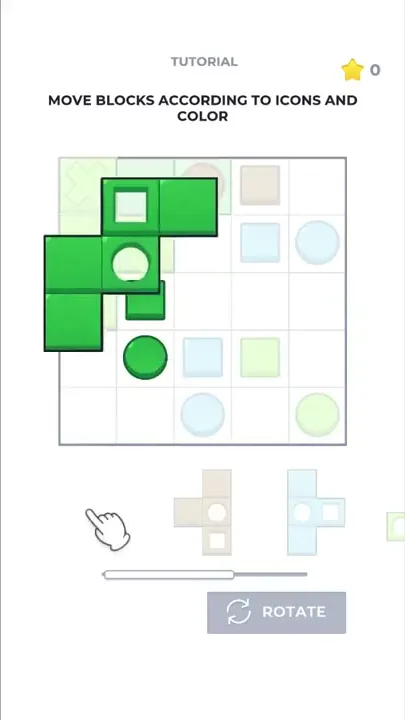
In the tutorial and Levels 2 to 4 that we played, the goal is to cover every cell of the 5x5 grid, and each numbered level starts from an empty one. Circle and square icons are printed on some of the cells, and each one has to end up under a hole of the same shape and color in the piece laid over it. In every placement seen, a piece’s solid parts went only onto empty cells.
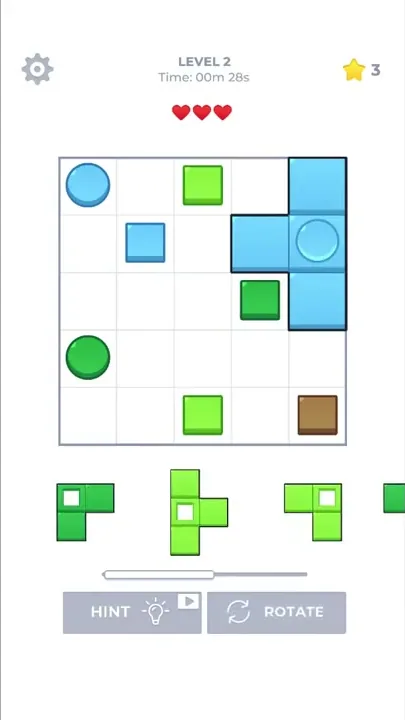
The icons come in two shapes and four colors: dark green, light green, blue and brown. When a piece covers one, the icon stays visible through the matching hole, raised in the piece’s own color.
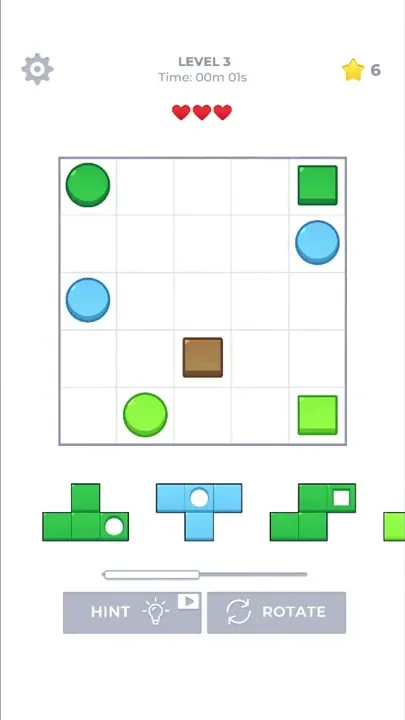
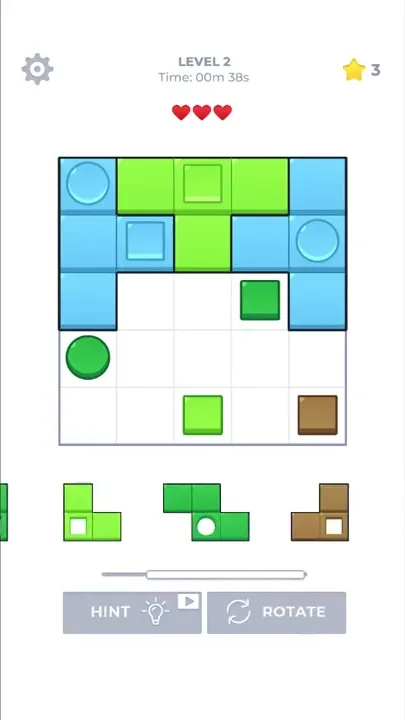
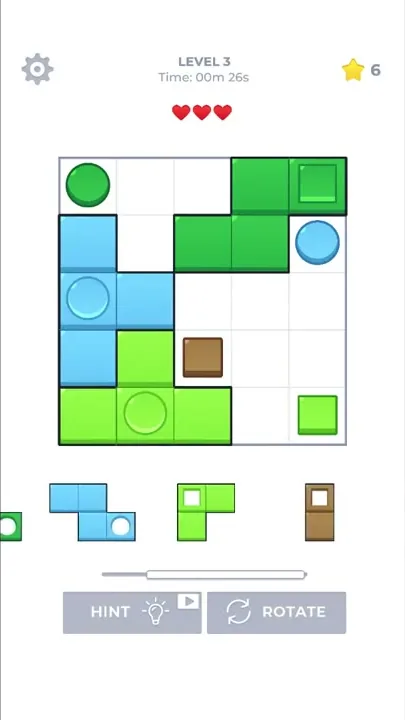
Each piece seen is a single color with one hole or two, each a circle or a square. Sizes run from two cells, like a small brown piece with a square hole in Level 3, up to five, like the dark green piece in the tutorial. A two-hole piece handles two icons in one move: in Level 2, a blue piece covers both the blue circle in the top-left corner and the blue square in the second row.
Blocks Square Blaster gameplay is drag and drop. When a piece is lifted out of the tray, it is drawn full size over the board, and pale cells in its color show where it will land.
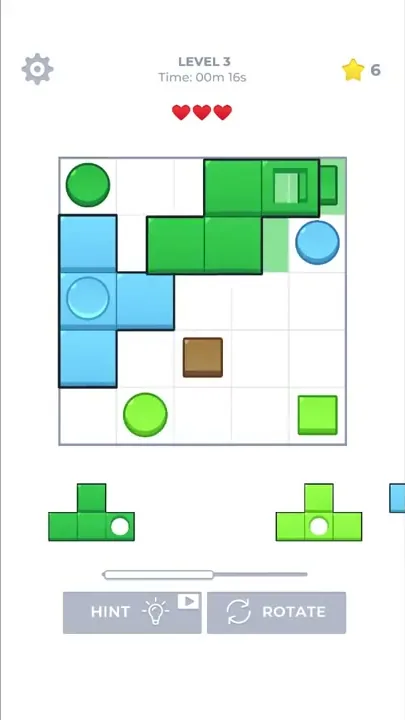
A ROTATE button under the tray turns the pieces waiting there. Partway through Level 2, every piece in view turned a quarter turn clockwise, and early in Level 3 every piece in view turned a half turn. The tutorial introduces the button with a hand pointing at it and the line “CLICK ON THE BUTTON TO ROTATE THE BLOCKS”.
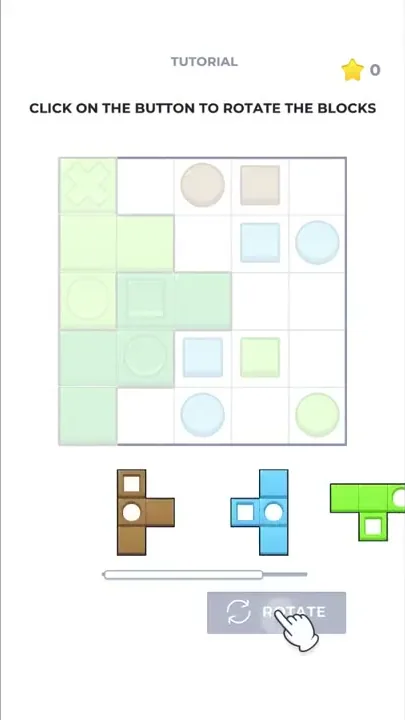
The pieces wait in one row below the board. When there are more than the screen can hold, the row scrolls sideways. Pieces get cut off at the edges, and a scroll bar underneath shows the position. Once the remaining pieces fit, the scroll bar goes away.
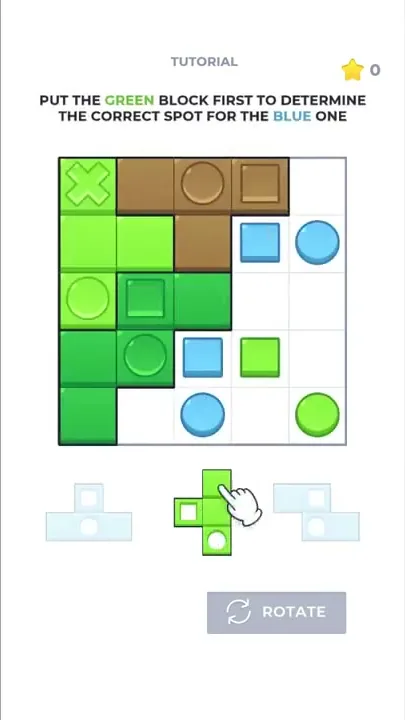
The tutorial board also has a light green X in its top-left cell, inside the light green patch in that corner. The same screen sets an order of moves, “PUT THE GREEN BLOCK FIRST TO DETERMINE THE CORRECT SPOT FOR THE BLUE ONE”, so placing one piece decides where another goes.
From Level 2 on, a timer counts up under the level label, with three red hearts below it. The Level 2 board was full at 00m 56s with all three hearts still red.
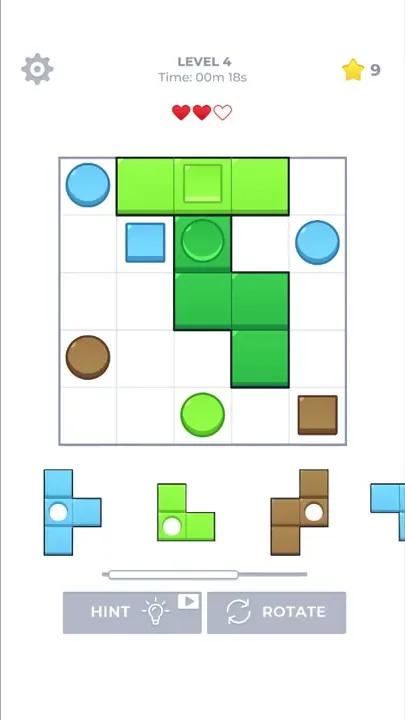
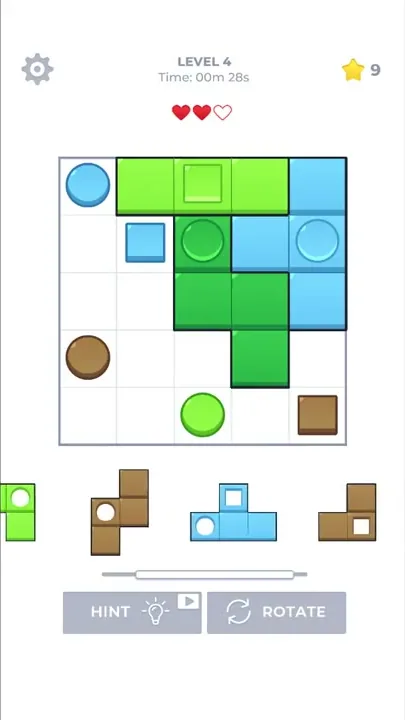
Brown shows up twice on the board early in Level 4: a circle at the left end of the fourth row and a square in the bottom-right corner, among blue and green icons. At 00m 03s a light green piece is already being dragged over the bottom row. By 00m 08s a straight three-cell light green piece with a square hole lies across the middle of the top row, its hole over the light green square there, and a dark green piece then goes over the dark green circle in the second row.
Next, a light green piece with a circle hole is dragged over the bottom two rows, its shadow on the third and fourth columns. Soon after, one heart has become an empty outline and that piece is back in the tray. It goes in later at a different angle, and the board is full at 00m 43s with two hearts left.
The screen is white. The grid sits in the middle with the tray below it and two gray buttons at the bottom. Blocks are one even color with a slight bevel, and placed pieces get dark outlines. A small burst of blue particles appears around a blue piece as it lands.
From a Guided Tutorial to Level 4
A screen labeled TUTORIAL teaches the rules one instruction at a time. An animated hand guides each step while everything except the active block is dimmed. The first instruction seen is “MOVE BLOCKS ACCORDING TO ICONS AND COLOR”, and the ones after it turn to the ROTATE button and the green-before-blue step. The tutorial shows the ROTATE button alone, with no level label or hearts above the board, and closes on a three-star “COMPLETED!” screen.
The next board is labeled LEVEL 2, and from there the screen also shows the timer and hearts. A settings gear appears in the top-left corner, and a HINT button joins ROTATE at the bottom.
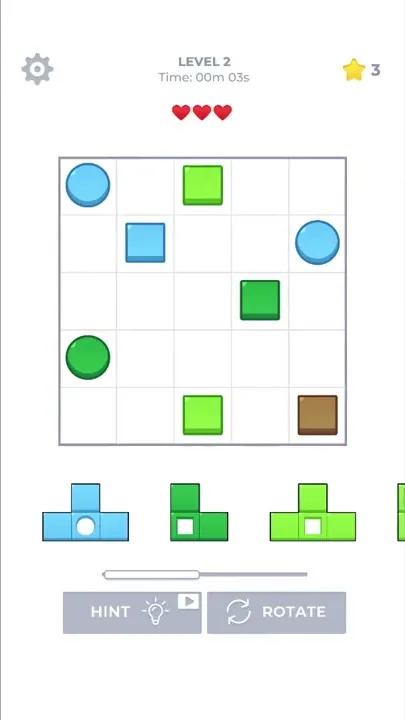
The grid stays 5x5 from one level to the next, while the icons and the tray are new each time. The opening Level 2 board has blue circles in the top-left corner and at the right end of the second row. Light green squares mark the middle of the top and bottom rows, and a brown square sits in the bottom-right corner. The Level 3 board puts a dark green circle in the top-left corner and a dark green square in the top-right one, with its brown square in the center of the fourth row. The trays change too: later in Level 3, a blue S-shaped piece with a circle hole shares the tray with a two-cell brown piece with a square hole.
On the Level 2 and Level 3 boards, brown appears only as a square icon, but early in Level 4 a brown circle shares the board with the brown square again, as the two did in the tutorial. The tray holds two brown pieces to match, one with a circle hole and one with a square hole.
Each results screen seen shows three gold stars over the word “COMPLETED!”. Below them sits the solved board, redrawn as a flat color picture without outlines or icons, with small green squares scattering around it. A wide NEXT LEVEL button sits underneath, with smaller HOME and RESTART buttons below it. After Level 3 the picture looks like a small tree: a dark green band over a brown center column, with blue at the sides and light green along the bottom.
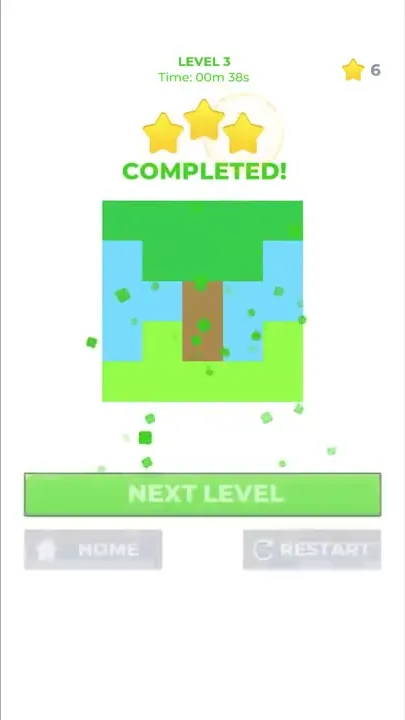
The stars collect in a counter in the top-right corner, which went up by three with each level finished. The HINT button has a light-bulb icon and a small play-button badge, and it was left untapped. The settings gear stayed closed as well.
Shaped Slots That Give Each Board a Goal
Block puzzles can easily lose their aim: players clear for the sake of clearing, and after a while the game is nothing but keeping an endgame alive. Blocks Square Blaster starts from that easy-to-pick-up formula and changes its rules and levels so each board is one puzzle to solve. In Level 3, the last blue piece has a gap of its exact shape waiting for it. We think that is a great kind of original take, because it gives a genre with a weak sense of purpose a stronger goal.
In the hand it’s a much better time than it looks, and the shaped slots are why: pieces have to be turned and fitted until every hole sits on its icon. You can see this when one blue piece in Level 2 covers a circle and a square, or when ROTATE swings the whole tray to a new angle.
Each level is a new arrangement of icons and pieces on the same 5x5 grid, a little like a Klotski layout (the classic sliding-block puzzle), which keeps new levels very cheap to make. Taken together, we count the design as a smart move. Playing it can also greatly improve a player’s real skill at block puzzles.
Open Questions Around Hearts and the HINT Button
We have no criticism of Blocks Square Blaster to report. What follows are limits of the boards seen, not faults.
One heart emptied in Level 4 around the time a light green piece went back to the tray, but what costs a heart, and what happens once all three are gone, did not come up. Whether a lost heart can lower the three-star result is also open, since that level’s results screen was not seen. The HINT button, the settings menu, the HOME screen and any boards after Level 4 were left unexplored too.
Reading Icons Before Dragging a Piece
A player matches each hole to an icon by shape and color, pictures how a piece will sit after the tray turns, and picks an order of placement so one piece pins down where the next belongs. The timed boards seen were all full in under a minute.
It shares its genre with games like block blast. In this one, each level hands over its own tray of pieces and a board of printed icons, which makes every board one self-contained puzzle.
Verdict
Blocks Square Blaster stays light and easy to pick up, and it gives block puzzles a stronger sense of purpose by making each board something to solve rather than something to clear. It is still a bite-sized hyper-casual game, but cut-out shapes hunting for their printed partners, along with a tray that turns, make it a much better time hands-on than that label suggests. Its new rules and levels add up to a great original take on a genre that is easy to learn.