Blockin Monsters Review: Row Clears That Fire at Monsters
This Blockin Monsters review covers an 8x8 block puzzle whose row clears shoot at oncoming monsters, plus its block and monster card decks.
Game at a glance
Blockin Monsters:Defense
8.5/ 10
Our score
Any game about blasting enemies could try a Survivor.io-style growth layer.
In this article6 sections
Blockin Monsters is a very complete game whose highlight is its mix: it plays like the mobile block puzzle games built on clearing rows, except that the clears fight off monsters stage by stage, with block and monster cards to collect and build up between stages. The look is where it needs more work.
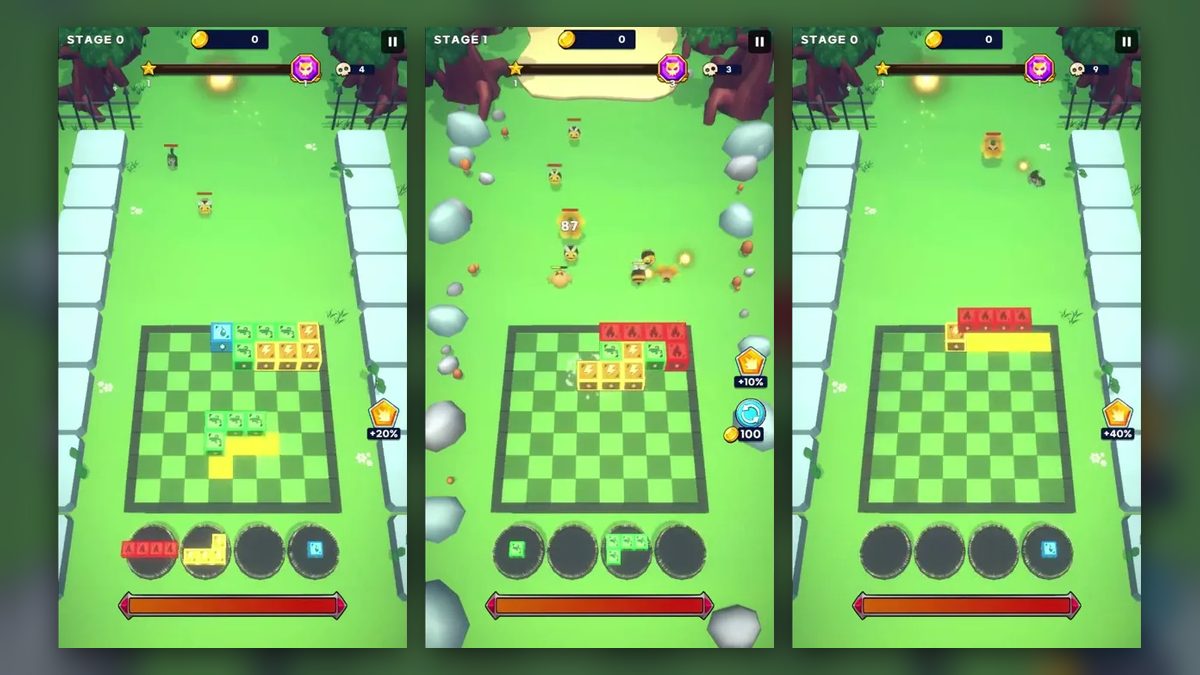
On a portrait screen, monsters walk down a grassy path toward the 8x8 board where the player places pieces. We played the tutorial stage, labeled Stage 0, plus a good stretch of Stage 1, which was still under way when we stopped.
Clearing rows to shoot the incoming monsters
Blockin Monsters gameplay splits between the battle screen and the menus between stages. In battle, monsters come down the field from the top while the player drags block pieces from a tray onto the 8x8 grid, and a row that is completely filled clears. A clear sends a burst of glowing shots up the field, and hits pop up as numbers over the monsters. New pieces keep arriving in the tray as more monsters come.
Early in Stage 0, four red flame blocks sit at the left end of the top row, and a yellow L waits in the tray. Once the rest of that row is filled, it clears and shots rise up the path. The stage ends soon after its last monsters near the top of the field take hits, on a Clear Reward screen with a coin tile labeled 100.
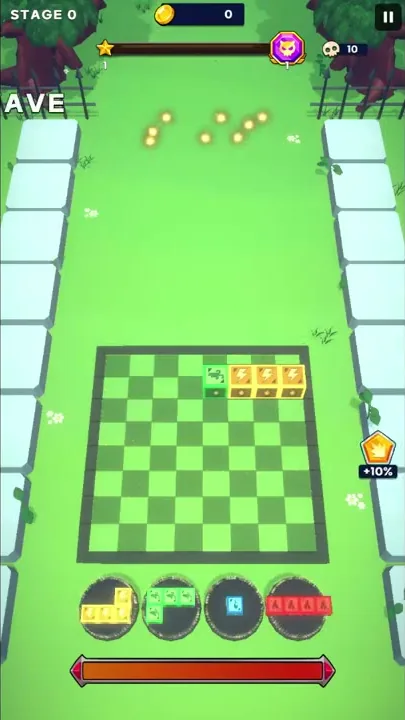
Pieces are dragged from four round tray slots below the board. While a piece is held over the grid, the cells it will fill light up yellow. A pause button sits at the top right of the battle screen, and in the tutorial a hand pointer shows where to drop each piece.
Blocks are glossy cubes, each in one color with a symbol on it. Red blocks carry a flame and yellow ones a lightning bolt. Blue blocks show a water drop, and green ones a dark green curled emblem. Shapes range from a single blue block to a red four-block line, with four-block L shapes in yellow and green, and pieces in all four colors sat in the tray together right after the first clear of Stage 0.
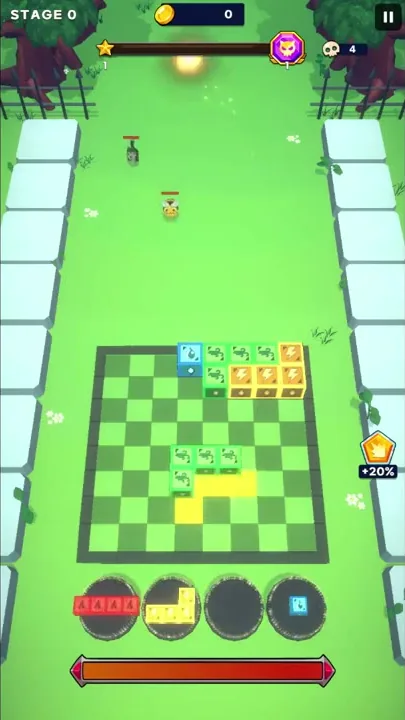
Monsters move down the field toward the board with small red health bars overhead. In Stage 1, small bee-like monsters share the field with larger yellow flower-like ones. A coin counter at the top climbs there as monsters take hits, and a skull counter sits at the top right.
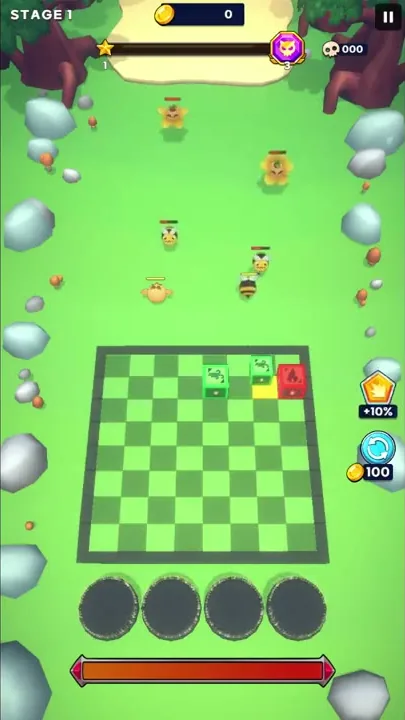
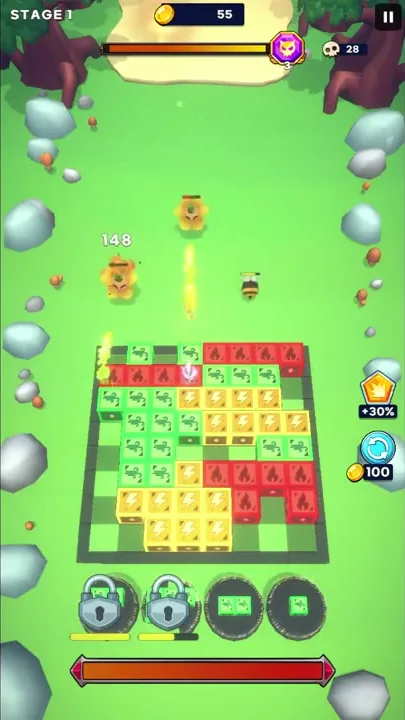
Stage 1 also has two creatures standing just above the board: an orange chick-like creature that looks like the Chick on its monster card, and a black-and-yellow striped bee-like one. Hits show as floating numbers. Most are white, but some are larger and red, with a small icon beside them.
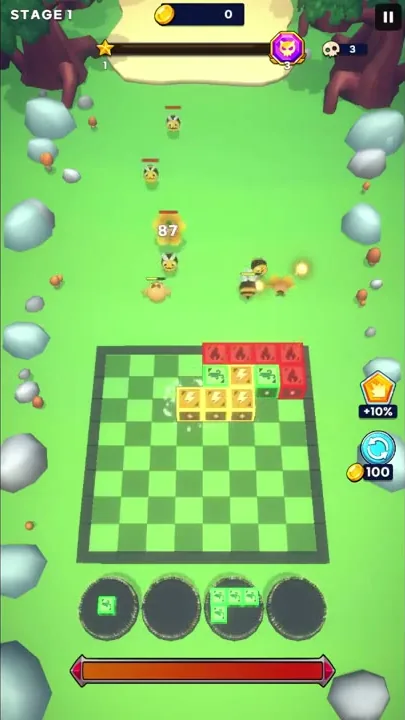
A crown badge with a percentage sits to the right of the board. In both stages it appeared at +10% right after the first row clear, and the figure rose as the stage went on.
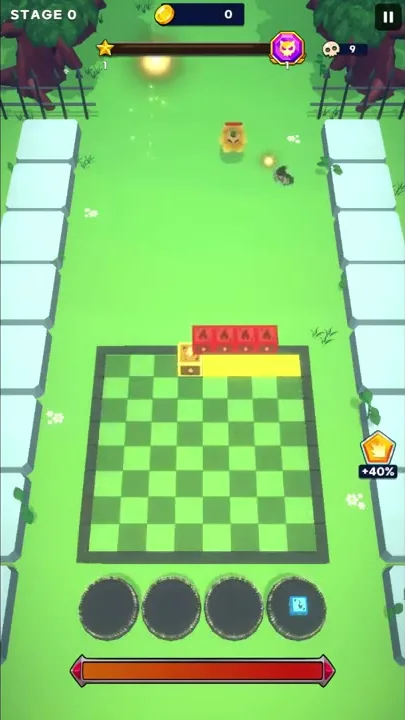
In Stage 1, a bar across the top of the screen fills from a star marker at the left, past a second star marker labeled 2, toward a purple monster-face badge at the right end. A long red bar also runs under the tray.
Some monsters get onto the board itself. In the middle of Stage 1 one stands among the placed blocks, and soon after, one is at the top edge and another at the bottom edge. Late in the stage, one stands on the top-left corner of a crowded grid.
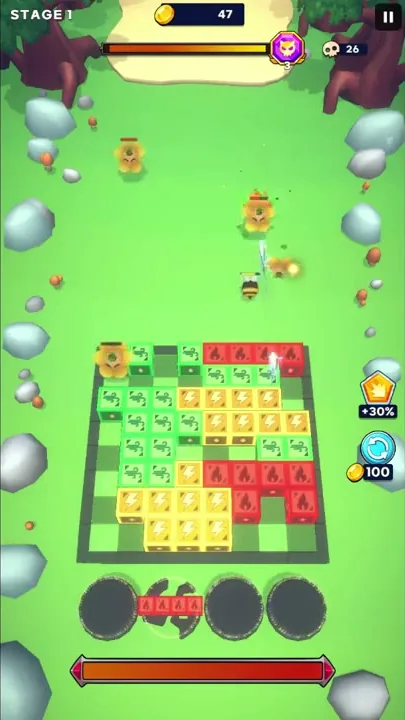
The tray changes late in Stage 1. A short yellow bar shows up under the second slot, and then that slot looks cracked, like broken stone, though pieces still appear in it. Later, padlocks cover the first two slots, each with a partly filled yellow bar beneath it.
From the tutorial path to card decks
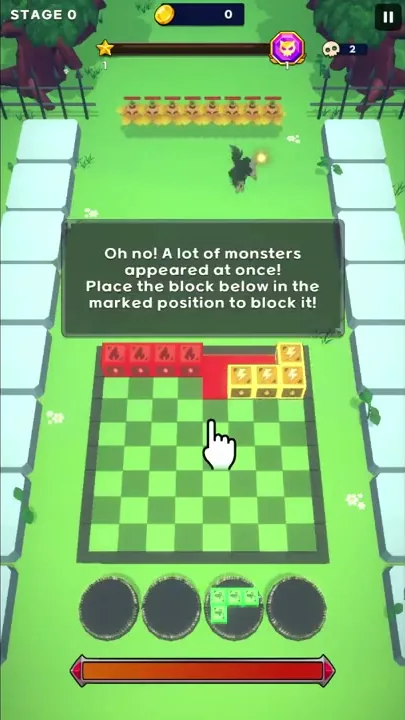
Stage 0 is a guided tutorial. Text boxes and a hand pointer show where each piece goes, the target cells are marked in red, and one box ends on “Beat the Monster!” A single dark creature walks down the stone-lined path first. Then a long row of small yellow monsters appears at once, under the warning “Oh no! A lot of monsters appeared at once!”
A Loading screen drawn as a blue-and-white checkerboard leads into Stage 1, which trades the stone-lined path for an open grassy field. Gray-blue rocks and small orange mushroom-like props sit along its edges, with a sandy clearing at the top. To the right of the grid, a round blue refresh button with circling arrows appears, with a coin icon and 100 beneath it.
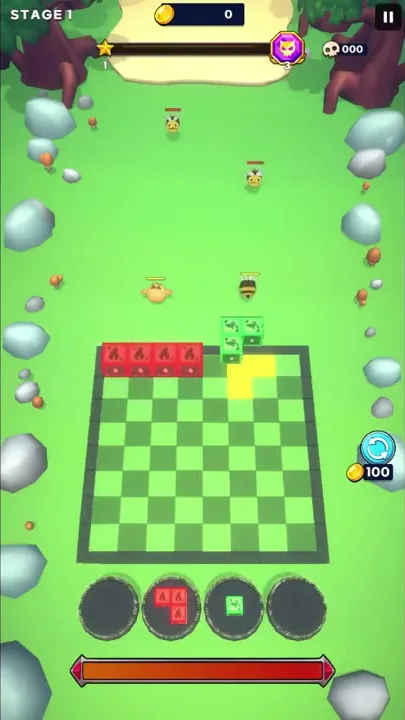
The pieces change too. After the tutorial swaps the blue single block out of the block deck, the tray in Stage 1 holds red, yellow and green pieces. Red comes as a four-block line or a bent piece and yellow as L shapes, while green turns up in sizes from a single block to an L of four, including a pair and a row of three.
Stage 1 also runs longer than the tutorial. Its top bar passes the second star marker and fills all the way to the monster-face badge, and by the late stretch blocks cover most of the grid.
Outside the stages, the Clear Reward screen sets its coin tile under a glowing shield with crossed swords and a blue level badge marked 1, with a bar beside the badge. The home screen that follows is a 3D island scene with a Bag button on the right and a settings gear at the top right, and it opens with a tutorial line: “First, I’ll teach you how to set the block deck.”
Five tabs line the bottom bar: Shop, Block, World, Monster and Dungeon, the last grayed out under a padlock. Along the top, a blue shield marked 1 sits beside counters for coins and blue gems plus a green lightning counter, each with a small plus sign.
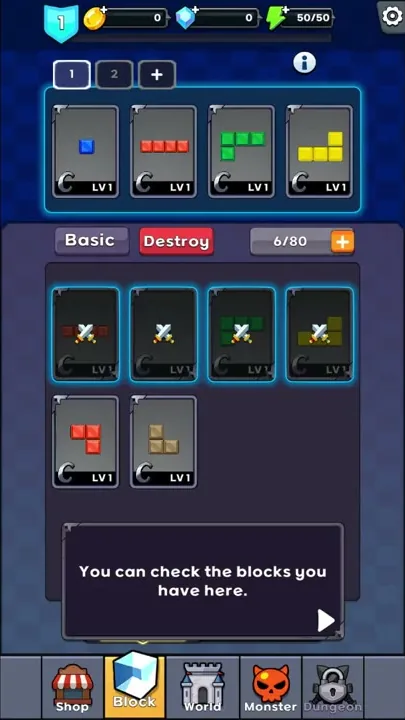
The Block screen sets the block deck, with tabs marked 1 and 2 plus a + tab above four cards. The deck starts with a blue single block and a red four-block line, then a green L and a yellow L, each card marked LV1 with a C badge. Below, a collection with Basic and Destroy tabs shows those cards dimmed under crossed swords beside a red bent piece and a tan piece, with a counter and an orange plus above them and Setting and Summon buttons at the bottom. The tutorial then swaps the blue single block for the red bent piece.
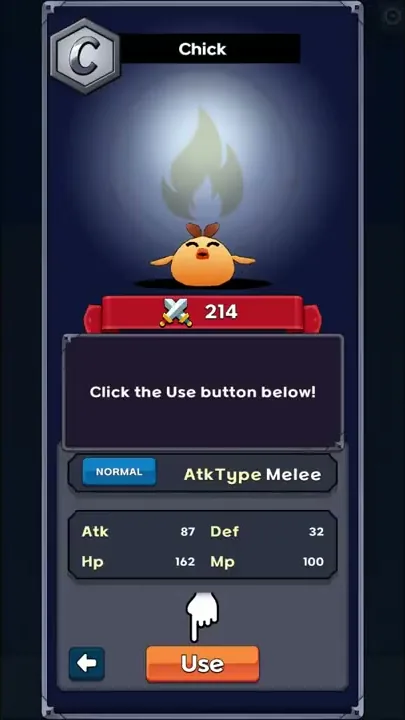
Monster cards carry stats. The Chick’s card shows a C badge and a crossed-swords power figure of 214, with a flame shape glowing behind the bird. Below a NORMAL tag and “AtkType Melee” come Atk 87 and Def 32, then Hp 162 and Mp 100, with a Use button at the bottom.
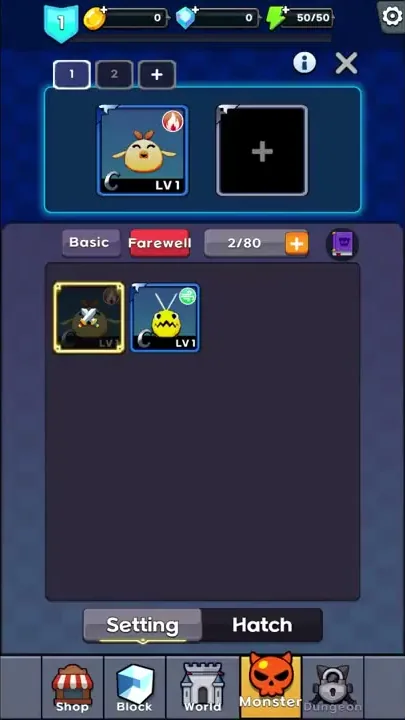
The Monster screen follows the same layout: tabs 1 and 2 plus a + tab, then two team slots, one holding the Chick (LV1, red flame badge) and one empty with a plus. Its collection has Basic and Farewell tabs and a counter next to a purple book icon, with Setting and Hatch buttons at the bottom. Inside are the Chick and a yellow monster with antennae and a green badge.
Block puzzle fights wrapped in card collecting
The highlight, in our view, is the pairing: a block puzzle that doubles as a stage-by-stage monster fight, with card collecting and card growth around it. Filling a row on the 8x8 board is the attack, and between stages the Block and Monster screens decide what goes into battle, from the four-card block deck to the Chick in the team slot.
It is also already a complete game. Stage 0 teaches the board step by step and ends on a Clear Reward screen. From the home screen, separate deck screens for blocks and monsters sit next to Shop and World tabs and a padlocked Dungeon.
We also found the long-term layer around the levels fairly deep. Block cards carry a C badge and a level, and monster cards come with full stat panels. The collections have Summon and Hatch buttons, and the symbols on the blocks sit alongside badges on the monster cards, such as the Chick’s red flame.
Survivor.io, where you move through endless swarms while your weapons fire on their own, has a growth layer outside its runs, and we think any game built on shooting or wiping out enemies could try to combine its core with one like it. Blockin Monsters does this with a block puzzle, which ties it to games like survivor.io through what sits around its stages rather than through the puzzle itself.
The look of the fields and menus
The look is a bit rough, and there is plenty of room to improve it. The fields are low-poly scenery with small monster models, and the menus use dark blue panels with cartoon icons.
Slotting shapes and sorting monster cards
On the battle screen, the player’s part is placement: dragging shapes from the tray onto the grid and filling rows, while the clears send shots at the monsters walking down the path. That fits a liking for slotting pieces into a grid while a fight plays out above it.
Between stages, the menus ask for a different kind of attention: comparing a monster card’s Atk and Hp, or deciding which block card earns a place in a four-card deck.
Verdict
Taken together, this is already a complete game, and its high point is how it ties a grid puzzle to stage-by-stage monster fights and a card-growth layer of graded, leveled cards. The art could still come a long way.