Idle Diner Review: Tap Titans Fights at the Dinner Table
A Tap Titans-style restaurant where red hit numbers pop over customers and a topknotted VIP closes each stage: the Idle Diner review.
Game at a glance
Idle Diner:RPG Chef Empire
7.5/ 10
Our score
Tap Titans number-crunching in a casual diner: new to us, and maybe a pretty good hook.
In this article6 sections
Idle Diner is a mashup of two things we had not seen together before. One is the number-heavy, more hardcore play of Tap Titans, the tap-to-attack game where waves of monsters fall until a boss turns up; the other is a casual restaurant theme. That pairing could make a pretty good hook.
In practice it is an idle restaurant game in which the monsters have become customers. A chef cooks while diners take their seats at four tables and red minus numbers pop over their heads. The cash they drop buys chef upgrades, and each stage ends with a single VIP customer in the role of the boss.
Red numbers over a busy dining room
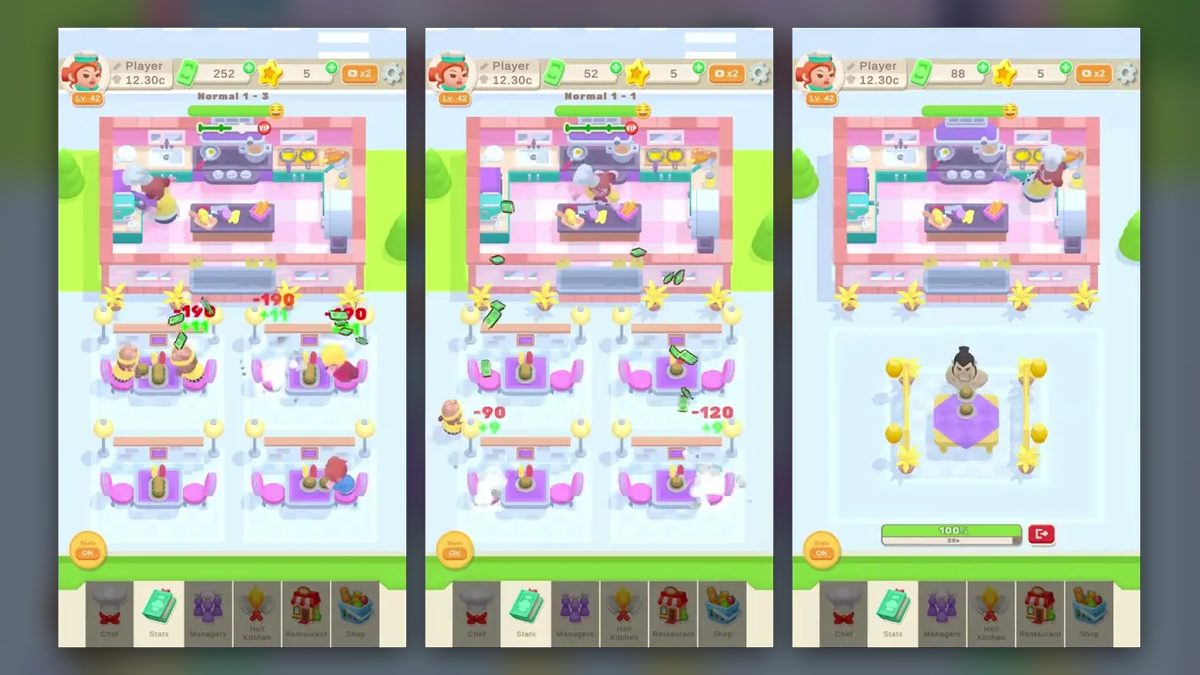
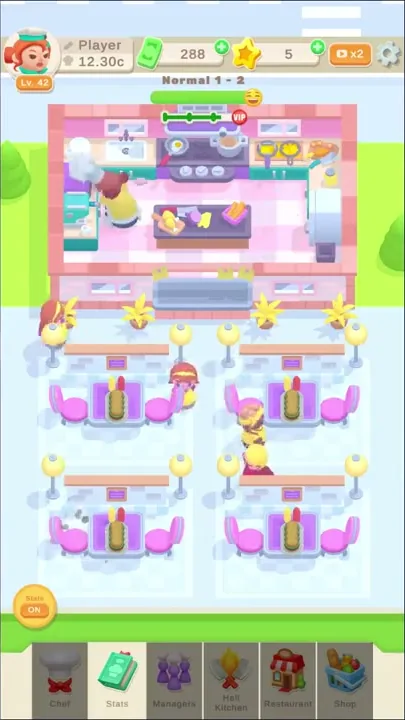
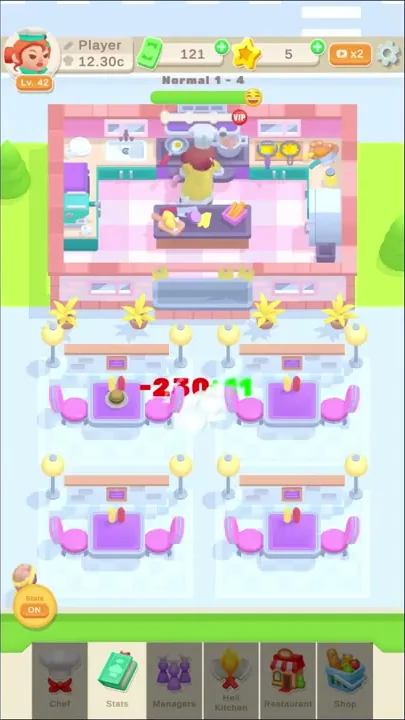
Idle Diner gameplay fits on one portrait screen. A pink kitchen with a checked floor fills the top third, the four dining tables stand below it in a two-by-two grid, and a menu bar with six tabs runs along the bottom. While the chef works, diners walk in to take their seats; red minus numbers then pop over them as green banknotes burst out. That cash pays for upgrades, and late in each stage the four tables give way to one VIP customer. There is no goal text on screen, and nothing like lives or a move counter ever appears.
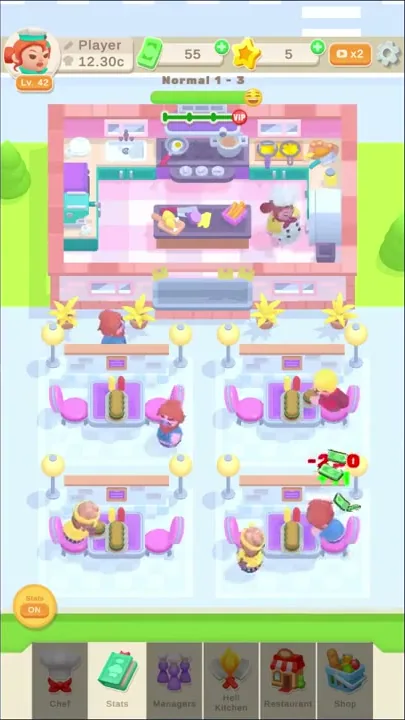
Cooking and serving run without any visible input, and so do the VIP fights. The hands-on part is the menu. Opening the “Stats” tab in the bottom bar slides a STATS panel up over the dining room, and while it is open the tab turns into a red X button. The kitchen stays in view above the panel and keeps working.
The diners are cartoon customers with different looks: red hair with a blue outfit, blonde hair with red, brown hair with yellow. They walk in from the edges of the dining area and sit on the pink chairs, two to a table. The red numbers and banknote bursts pop over them once they are seated, and white puffs appear at their seats. Early in the first stage, short green bars also float above two of the seated diners.
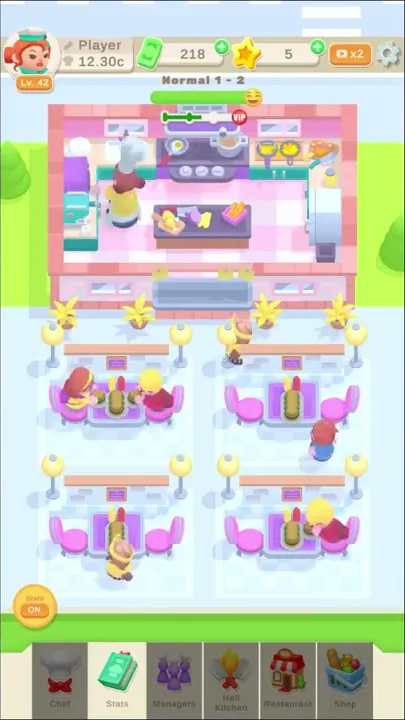
The chef is a red-haired woman in a white chef’s hat and a yellow outfit, drawn like the avatar in the player profile at the top left. She moves from the stove in the middle to the pans and white fridge on the right, then over to the teal counter on the left and the central island with its chopped vegetables. She keeps cooking while the STATS panel is open and all through the VIP fights.
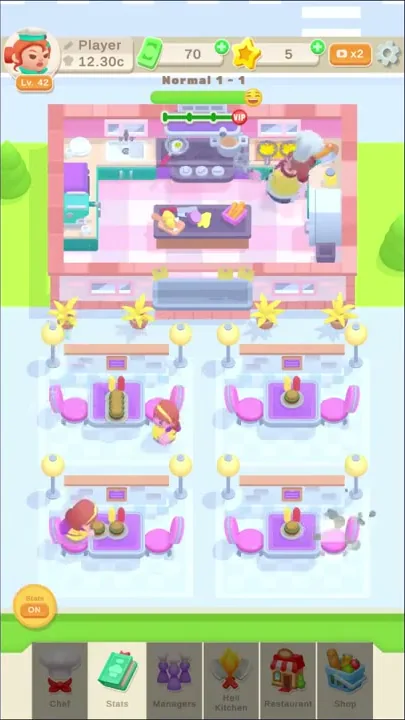
The red numbers are hits, and they match the current Cooking value in the STATS panel. With Cooking at 190, the diners went on to show -190; once Cooking had climbed to 230, the hits over the tables read -230. The VIP takes the same red numbers when his turn comes.
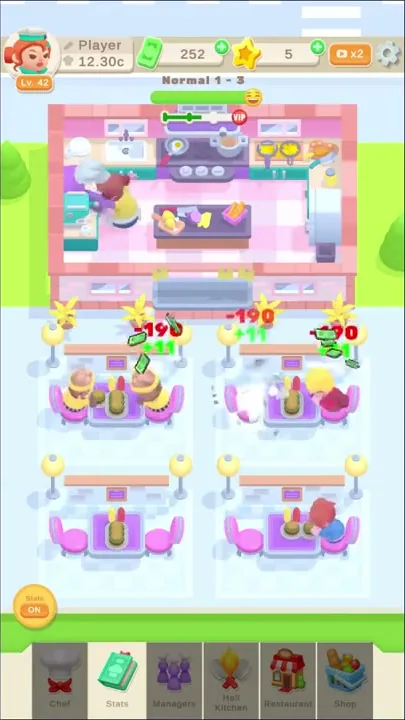
Each hit comes with a small green plus number, +9 early on and +11 later, and a spray of green banknotes out of the diner. More banknotes fly around the teal counter in the kitchen, and the cash counter at the top keeps rising as diners are served.
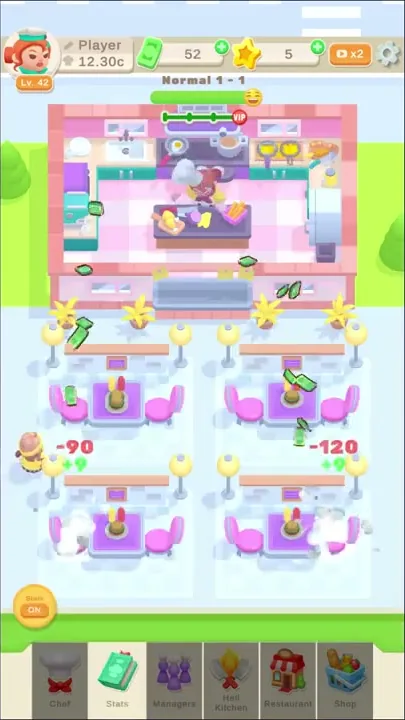
A short dotted track ending in a red VIP badge sits at the top of the kitchen, just under the stage label. It starts each stage white and fills with green from the left as the stage goes on. During the VIP fight it disappears along with the label.
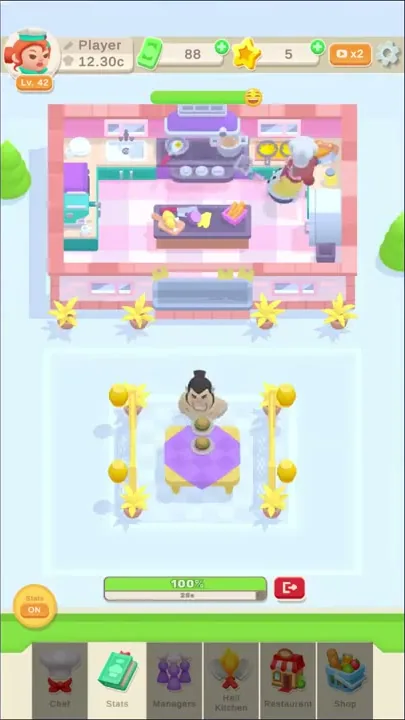
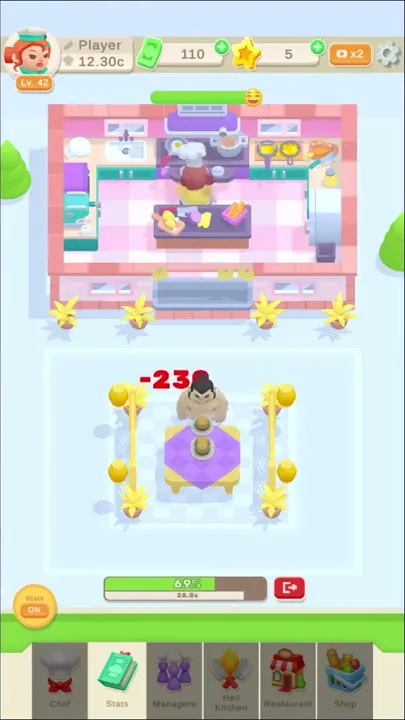
Late in a stage the four tables and their lamp posts vanish. In their place stands one table with a purple checked cloth and a stacked dish, ringed by golden posts with yellow plants at the corners, and behind it sits the VIP: a big bare-chested man with a black topknot. Under him are a green bar with a percentage, a thinner bar with a very small number, and a red button with an exit-arrow icon.
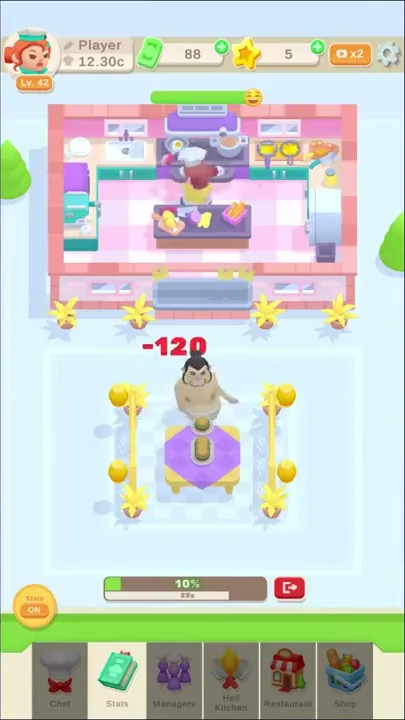
Red numbers then land on the VIP and his percentage falls. In the first fight it dropped from 100% to 10% under -120 hits while the cash counter held still, and the next stage label, Normal 1 - 2, followed. No fail screen came up in any fight, and the red exit button was never used.
The stages we played ran from partway through Normal 1 - 1 into Normal 1 - 4, with three VIP fights along the way. A white VIP track and a -120 hit over the top-right table open Normal 1 - 2, and later in the stage the track is mostly green. In the STATS panel, Cooking reads “190 -> 200” for 56 cash, its button paler because the cash on hand falls short; a round of Extra Dish upgrades then leaves every button pale. The VIP arrives with his bar full at 100%, sinks to 25% under red hits, and gives way to the label Normal 1 - 3.
Cooking upgrades and a returning VIP
The stage label at the top counts up after every VIP fight, from Normal 1 - 1 through Normal 1 - 4, and each of the two middle stages lasts about a minute. The setting never changes along the way: every new stage brings back the same pink kitchen and the same four tables, with the VIP track white again at the start.
The boss stays the same as well. The bare-chested man with the black topknot closes Normal 1 - 1, Normal 1 - 2 and Normal 1 - 3 alike, at the same table ringed by golden posts. In the third fight his bar went from 69% to 37% as the red hits kept landing.
The numbers are what grow. Red hits climb with each Cooking upgrade: -10 early in Normal 1 - 1 and -120 before that stage was over, then -190 in Normal 1 - 3 and -230 as soon as Normal 1 - 4 begins. Cooking goes up by 10 per step and its price climbs with it, from 11 cash for “20 -> 30” to 56 for “190 -> 200” and 81 for “230 -> 240”.
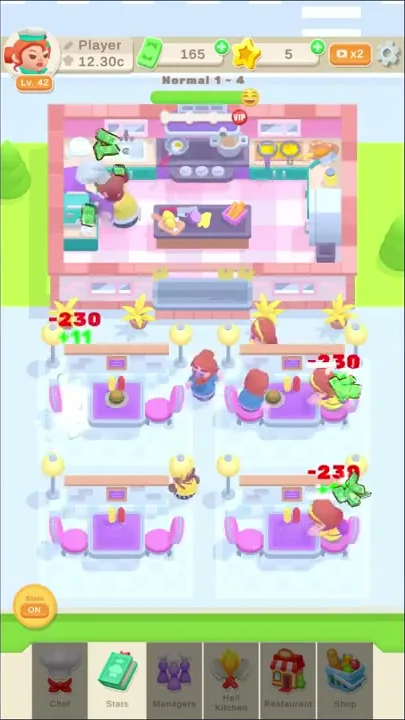
Outside the stages, the top bar keeps two counters. Cash, shown with a green banknote and a green plus button, rises while diners pay and drops when upgrades are bought: one step of Cooking at 11 and one of Extra Dish + at 7 took exactly 18 off it. Beside it, a yellow star counter has a plus button of its own, though nothing in the four stages earned or spent a star.
The STATS panel is where that cash goes. Four rows are visible, “Cooking”, “Service”, “Extra Dish %” and “Extra Dish +”, with a fifth cut off at the bottom edge. Each row has an icon and a “current -> next” value, plus a green button showing the price. Service stayed at “1 -> 1.01” for 20 the whole time, while Extra Dish % moved from “0.1 -> 0.2” at 16 to “0.4 -> 0.5” at 21. A button turns paler whenever the cash falls short of its price.
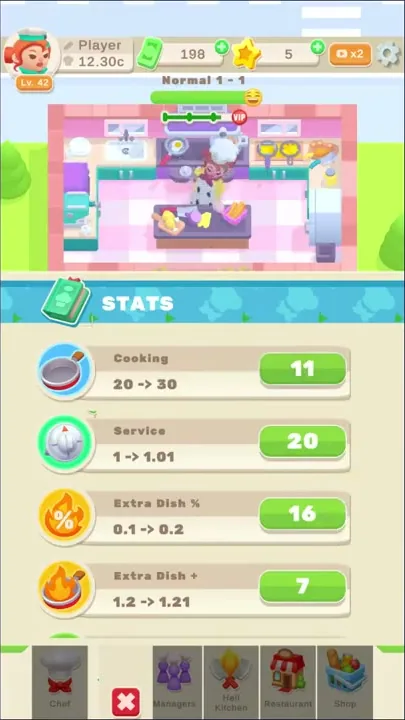
Six tabs run along the bottom: “Chef”, “Stats”, “Managers”, “Hell Kitchen”, “Restaurant” and “Shop”. Only “Stats” was opened. At the top right sits an orange x2 button with a camera icon, which was never pressed, and a gear icon sits at the far right of the same bar. The top left holds the player profile: a red-haired chef avatar with a level badge, the name “Player” beside a pencil icon, and a short value next to a small gray icon. No ads or offers popped up at any point.
Customers playing the minions and the boss
Under the restaurant dressing sits the structure of Tap Titans. Red hit numbers over seated diners, numbered stages that each close on a boss-style VIP fight, and stat upgrades bought with the cash all follow that formula, yet everything plays out in a pink kitchen and a dining room. A more hardcore, number-heavy design in a casual restaurant theme is new to us, and the mashup may well be a pretty good way in.
Both kinds of enemy are customers here. The regular diners, in their mix of hair colors and outfits, stand in for the monsters of a Tap Titans stage and take the steady run of red hits. The boss role goes to the VIP, who sits alone behind golden posts with a percentage bar under him.
The look and animation are rich and lively, and they add some lightness and a casual air to an experience that is otherwise heavy on numbers. The chef keeps moving around the kitchen. Diners walk in and out between the tables, and each hit throws off a spray of banknotes with a white puff at the seat.
The art style is fairly mature. The pastel 3D scene is seen from a high, tilted angle: a pink-and-white kitchen with a checked floor, spiky yellow plants in pots along its front, purple tables with pink chairs, and lamp posts topped with yellow globes, all set on green lawn with round trees at the edges. The VIP’s table, with its golden posts and yellow plants, is drawn in the same style.
Menu tabs left closed and no visible touch
We have no criticism of Idle Diner to report; the points below are limits of what the four stages showed. No touch appears on screen at any point, so the tapping side of the Tap Titans formula never comes into view, and whether a tap speeds up the kitchen is not shown. One VIP, the same topknotted man, closed all three stages.
Five tabs, “Chef”, “Managers”, “Hell Kitchen”, “Restaurant” and “Shop”, stayed closed, so their contents and any prices inside are unknown. The x2 button was never pressed and no star was earned or spent, which leaves both of them unexplained. Nor do the stages show what Service and the two Extra Dish rows change.
A taste for watching cooking numbers climb
The visible hands-on part of Idle Diner is spending. The player opens the STATS panel, puts the cash into Cooking and the other rows, then watches the red hits over the tables match the new Cooking value. Cooking and serving go on without visible input between purchases while the cash builds toward the next price, and each stage closes with the VIP’s bar draining. That fits a taste for watching numbers grow more than for steering anything by hand, with a chef and her customers where monsters would usually be.
Verdict
Idle Diner’s draw is the pairing at its center: the hits and stage bosses of Tap Titans, moved into a restaurant where every enemy is a customer. Lively look and animation give that numbers-first design some lightness, and the art style is fairly mature. It is a combination we had not come across before, and it could be a pretty good hook.