Mowing Tank Review: A Tank Built Out of Chest Parts
A 12-slot grid of chest-won tank parts backs up countdown battles against white creatures; our Mowing Tank review walks through both halves.
Game at a glance
Mowing Tank
7.5/ 10
Our score
Called this exact mashup in advance. Seer claim confirmed.
In this article6 sections
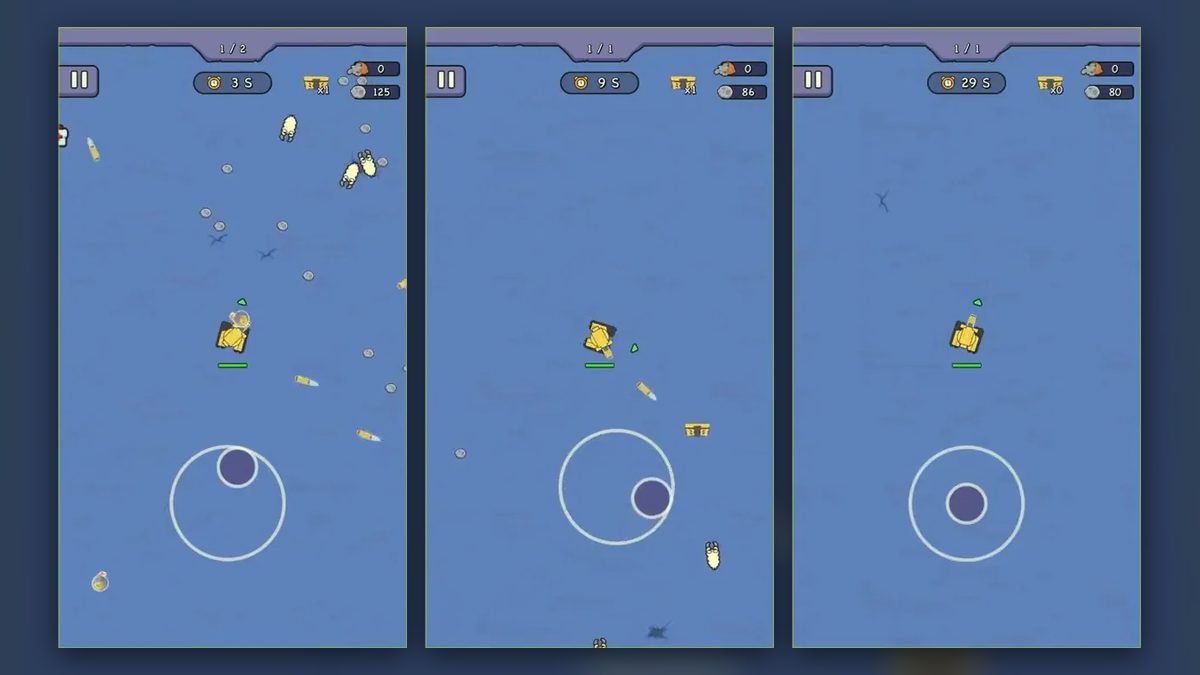
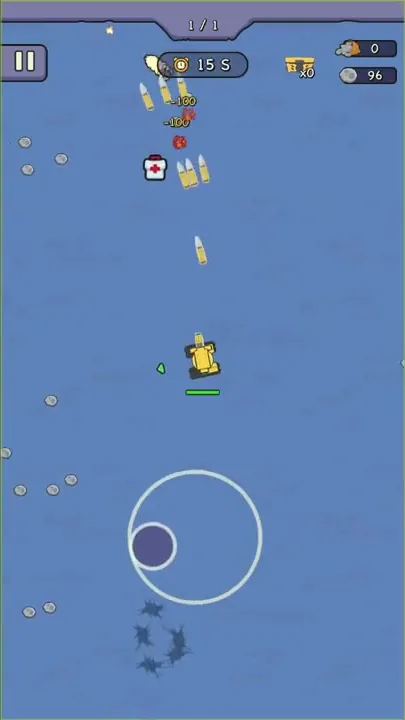
Midway through Chapter 1 of Mowing Tank, a small gold chest lies up-field from the yellow tank, and a -110 floats beside one of its shells off to the right. A moment later the chest is gone from the field and the counter at the top of the screen has gone up by one. A second chest waits to the lower right, and a small white creature is coming up from the bottom edge.
Under the tank paint, the game belongs with the vampire survivors like mobile games. It has short countdown battles in which shells cut down creatures while the player steers, then a home screen where tank parts come out of a chest one at a time.
Its fights follow the horde-mowing combat of Survivor.io, the game where you move through endless swarms while your weapons fire on their own, and that puts Mowing Tank among the games like survivor.io. Its home screen borrows the chest-opening loop of a different game, and that pairing is the draw. The craft is not especially fine yet, and the premise could think bigger.
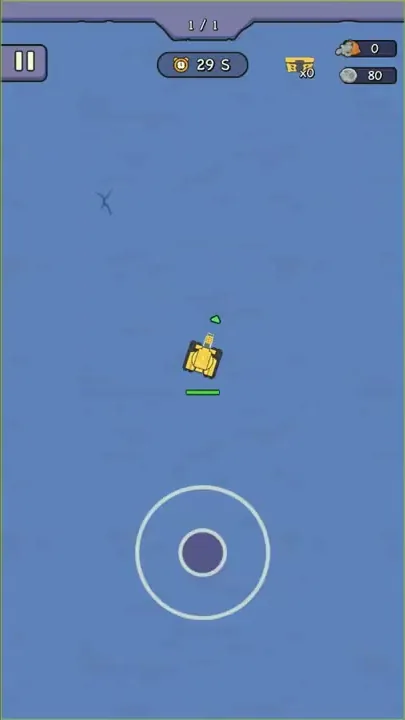
Steering a yellow tank against the countdown
We played parts of three timed runs: the last 15 seconds of one already under way, Chapter 1 from its opening panel to 0 S, and the first stage of a run marked 1 / 2. About a minute of chest opening on the home screen came between the last two. The goal of a stage is to last until the countdown clock at the top of the screen runs out.
The stage counter is centered at the top with the clock beneath it. Beside them are a chest counter and, at the top right, two more counters, one with an orange icon and one with a gray stone. A small green health bar hangs under the tank with a small green arrow beside it, and the camera keeps the tank at the center of a flat blue field with a faint texture. The tank and the creatures are simple cartoon sprites outlined in dark lines. At times a dark jagged strip runs along the top or bottom edge of the screen.
Steering comes down to a virtual joystick near the bottom center: a white ring with a purple knob that slides inside it as the tank turns and drives. The battle screen shows no fire button, yet shells keep flying out of the tank. The pause button is tucked into the upper-left corner. Menus run on taps, and a white pointing hand hovers over the chest at one point and over the “Start game” button at another.
A stage runs like this. The player steers the tank around the open field while its shells meet the small white creatures closing in, and collects the gray stones and small gold chests lying around until the clock hits zero, with medkits also scattered on the field. In the run marked 1 / 2, the end of the clock led to a stat-boost pick and then to a shop paid in stones before the next stage. Between runs, chests are opened one at a time on the home screen for tank parts, each one equipped or dismantled, and then the next run starts.
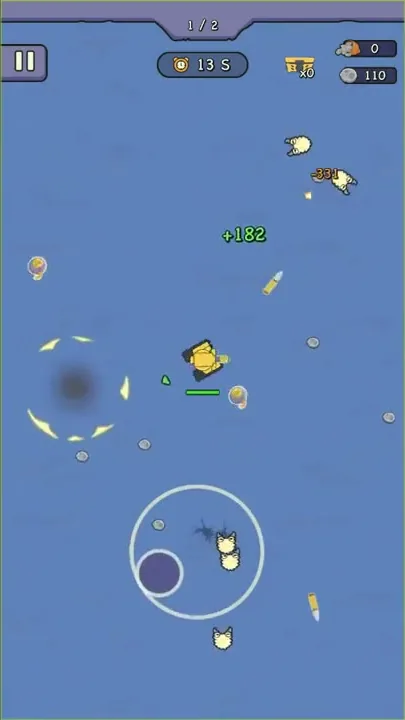
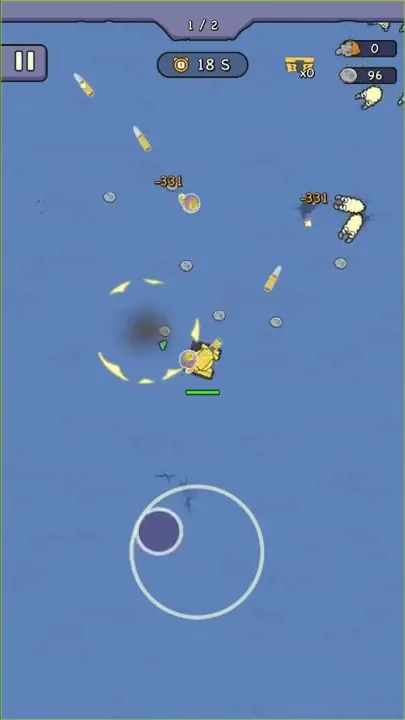
The enemies are small white cartoon creatures that come at the tank from the edges of the screen. In Chapter 1 they arrive one or two at a time; in the run marked 1 / 2 they come in groups from several sides. Orange damage numbers pop where the shells land, and dark splat marks stay on the ground.
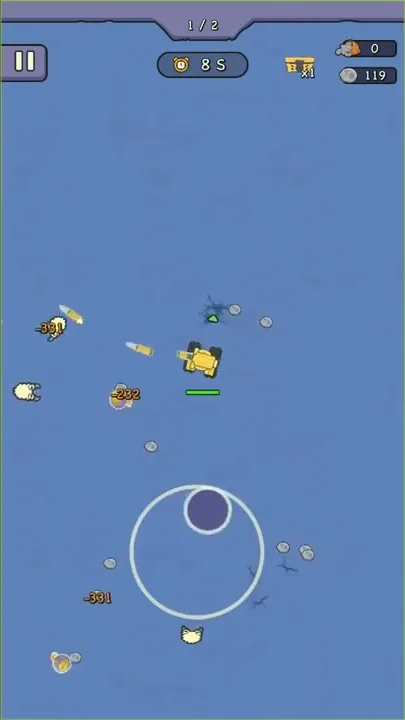
Small gray stones lie around the field, and a counter with the same stone icon at the top right climbs as a stage goes on. Stones are the run’s currency. Between stages they pay for shop cards and for refreshing the offers on screen.
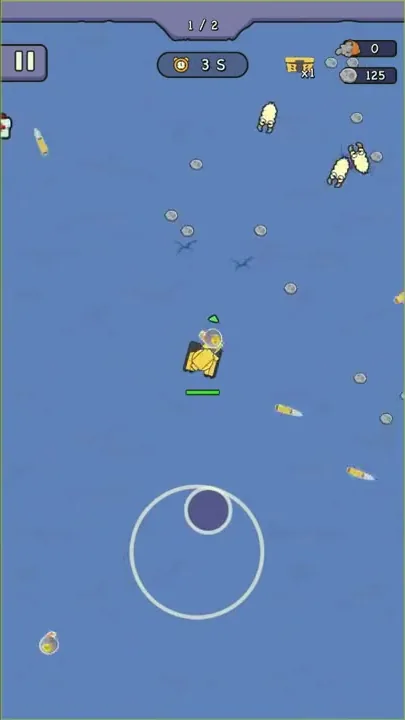
Small gold chests turn up on the field as well. A chest icon at the top of the battle screen keeps count of the ones collected during the stage.
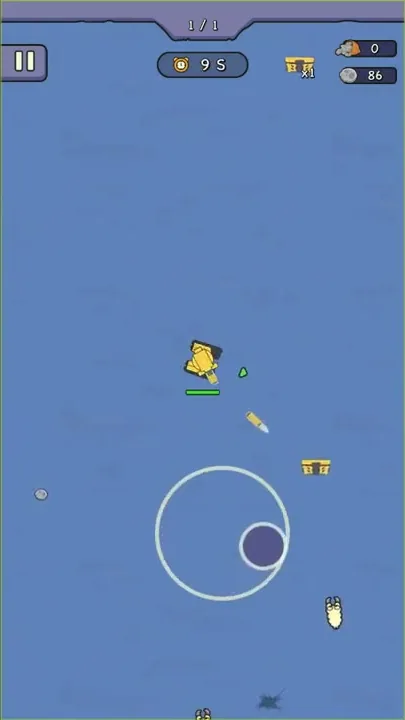
Medkits, white boxes with a red cross, also lie on the field. Green numbers pop up beside the tank now and then, such as a +75 in Chapter 1 and a +182 in the later run, set apart from the orange damage numbers by their color.
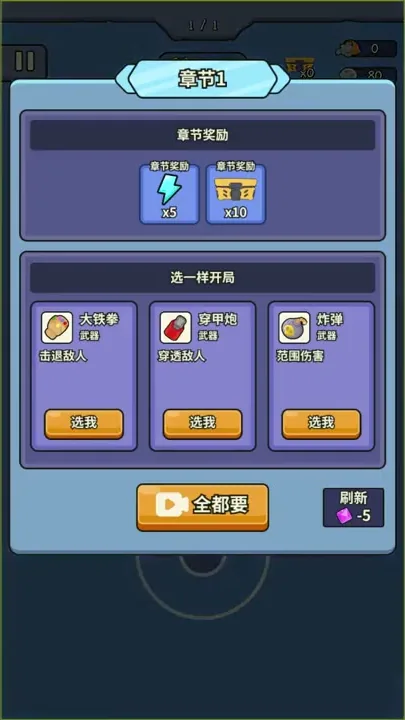
Chapter 1 opens with a panel whose “Pick one to start” section offers three weapons, each with a “Pick me” button: the Big Iron Fist, which knocks enemies back; the Armor-piercing cannon, which pierces them; and the Bomb, for area damage. A “Take them all” button carries a small camera icon, and a “Refresh” option shows a purple gem with -5. The top of the panel lists the chapter’s rewards: lightning x5 and chests x10.
In the run marked 1 / 2, round orbs with a yellow-orange center show up near the tank. Circular blasts go off around the field, each drawn as a ring of yellow crescents around dark smoke, and one of them throws out gray debris next to a damage number of 232.
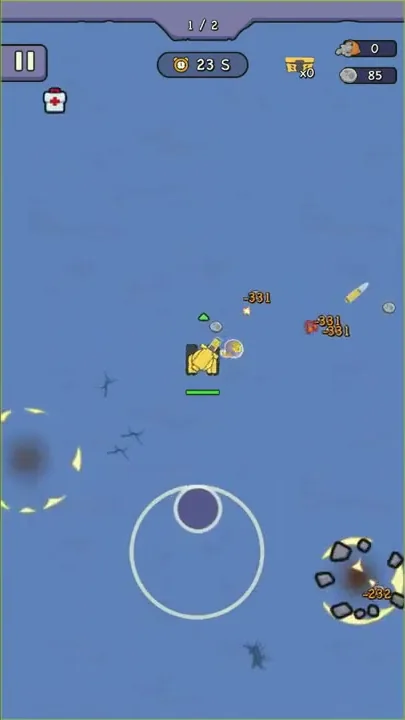
An empty blue field and 30 S on the clock opened the first stage of that run, with the tank parked alone at the center. Before long, blasts were bursting on two sides of the screen and shells were landing for 331. Further on, creatures pressed in from the top and the bottom while a green +182 floated near the tank. With 3 S left, gray stones lay scattered all over the field, and once the clock ran out a “Stage clear reward” panel took over, with confetti falling over it.
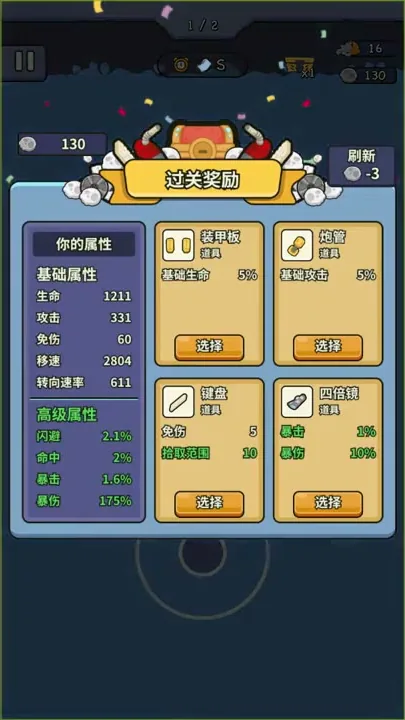
That panel offers four item cards, each with a “Select” button. An Armor plate gives +5% base HP and a Gun barrel +5% base attack; a Keyboard pairs 5 damage reduction with 10 pickup range, and a 4x scope pairs 1% crit with 10% crit damage. Refreshing the cards costs 3 stones. Beside them, a “Your stats” sheet lists five base stats, from HP to Turn rate, and four green advanced ones, from Dodge to Crit damage. On the next screen Crit had moved from 1.6% to 2.6% and Crit damage from 175% to 185%, matching the 4x scope card.
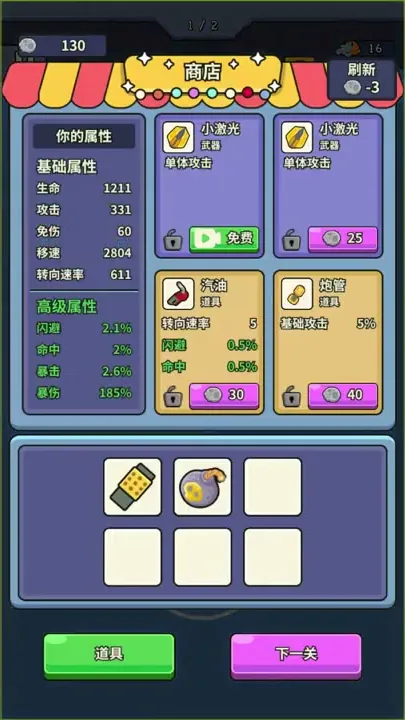
Next comes a “Shop” panel under a striped awning, selling cards for stones. Two purple Weapon cards offer a Small laser for single-target attacks: one is marked “Free” next to a small camera icon, and the other costs 25. Two tan Item cards offer Gasoline, worth 5 turn rate plus 0.5% each of dodge and accuracy, for 30, and another Gun barrel for 40. Each card carries a padlock icon, and a refresh again costs 3 stones. Below sits a grid of six slots with two filled, one by a yellow striped item and one by a round bomb, and the panel closes with a green “Items” button and a pink “Next stage” button.
From stray creatures to blast-filled stages
A stage counter at the top tracks progress through a run. It read 1 / 1 through Chapter 1, whose clock ran from 29 S down to 0 S, and then the home screen came up. The later run read 1 / 2 and started at 30 S. When its clock ran out, the game moved to the reward pick and to the shop with its “Next stage” button instead of going home. The tail end of the opening run, also marked 1 / 1, gave way to the home screen and a newbie gift panel once it hit 0 S.
The field filled up more in the later run. At the start of Chapter 1 it is empty, and from about its midpoint creatures arrive one or two at a time along with a few chest pickups. In the run marked 1 / 2, more creatures share the screen at once and blasts go off around the tank. The damage numbers grow too: hits read 100 in the opening run and 110 in Chapter 1, against 331 and 232 in the later run, and the stat sheet after that stage lists Attack at 331.
Outside battle, the game returns to a home screen set in a dim room, with cobwebs in the upper corners and a green-lit window behind the equipment grid. The tank stands at the center of 12 part slots, six on each side. Each filled slot shows a part icon and its level; most read Lv 1, with a chassis at Lv 3 and a fuel tank at Lv 2. A “Stat details” button sits under the tank, with “Tasks” and “Check-in” buttons above the grid, and the chest pedestal and the “Start game” button fill the space below.
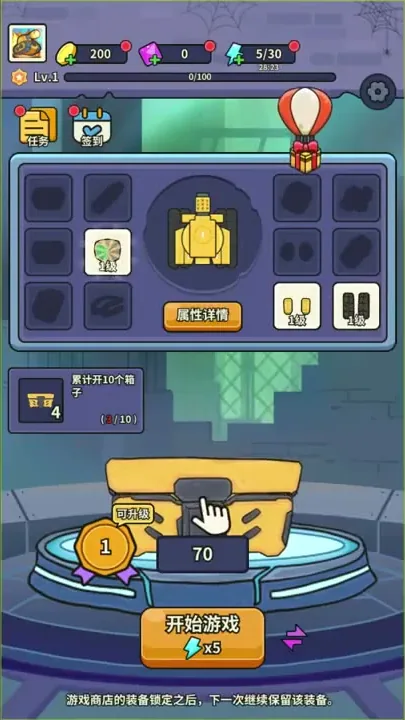
Chests open one at a time on that pedestal, where a big gold chest stands above a number that drops by one with each part that comes out. A new part pops up on a card tagged “New” that names the part and shows a quality such as “Worn”, along with its level and stats. Tracks came out this way, later followed by Binoculars and a Silencer. An opened chest also spills coins and a green gem marked EXP, and a badge reading 1 sits beside the chest with an “Upgradable” tag.
When a new part matches a filled slot, the two cards appear side by side, with the old one tagged “Equipped”. Green up arrows and red down arrows compare their stats, as when a Lv 3 chassis faced a Lv 1 chassis. “Equip” and “Dismantle” buttons sit below the cards over a “Let me think” link, next to a checkbox for dismantling the old part automatically after equipping.
Parts carry base stats drawn from the five on the in-run sheet (the Tracks list all five, while the Binoculars and the Silencer show only HP and attack), plus green advanced stats such as dodge, accuracy, crit and crit damage. A “Newbie gift” panel lays out 12 part types, from the main gun and cooling system through the chassis and suspension to the engine and tracks. Its two buttons are “One at random” and “Take all”, the second with a camera icon.
A “Daily check-in” calendar runs for seven days. The first day gives 200 coins and was already checked off; the second gives 50 green gems. Purple gems fill the third day with 10, then the fifth and sixth with 20 and 40. The fourth day holds 30 chests, and the seventh, drawn with tank artwork, holds 200. Beside the “Claimed” button, a “Claim extra” button with a camera icon sits under a 600-coin offer, and a countdown shows the time until the next check-in.
The counters along the top of the home screen hold the rest of the economy. Coins come from the check-in and spill out of opened chests, though we can’t say what they buy. Purple gems pay for refreshing the starting-weapon choice, at 5 a time. Lightning works as energy: its counter is shown out of 30 with a small countdown timer under it, the “Start game” button carries a lightning icon marked x5, and Chapter 1’s rewards include lightning x5 as well. Under the counters, a player level with an XP bar out of 100 climbed during the chest opening.
A “Tasks” panel has two tabs, “Daily tasks” and “Achievements”. Each achievement shown has a progress bar and a reward. Defeating 10 enemies in total and clearing the second chapter pay 5 chests apiece, as does reaching player Lv 2, while bringing the chest to Lv 2 pays 30 green gems. The first two were ready to claim and the other two were still in progress.
A goal card on the home screen read “Open 10 chests in total” with a 4-chest reward, and it glowed once the count reached 10/10. On the next screen a “Congratulations” popup showed chests x4, and the card had switched to “Complete 1 battle” for 3 chests.
A red-and-white hot-air balloon carrying a gift box drifts across the home screen, and at one point a gift box icon sits at the bottom under a pointing hand. Along the bottom edge runs a line of tips that changes from screen to screen. One reads “Failed a stage? Open some chests and upgrade your gear,” another “Area weapons work well against big crowds.”
Chest-opening gear married to horde fights
The mashup of chest-opening gear and Survivor.io’s horde-mowing combat, here dressed up as a tank, is the very combination we had predicted, back when we were weighing which popular games could be fused into a fresh idea. In the field, the tank steers through white creatures against a countdown clock. At home, the chest on its pedestal hands out tracks and binoculars, and each part for a filled slot is weighed against the one already fitted, green arrows against red.
A fun long-term layer around the levels joined to fun fighting can spark entertaining chemistry, and here both halves feed the same stat sheet. On the compare screen, the equipped Lv 3 chassis beats a new Lv 1 chassis on every line. Right after the reward pick, the stat sheet shows crit gains that match the 4x scope card, so chest parts and between-stage picks build the same tank.
Craft and a tank premise with room to grow
The craft is not especially fine yet. The choice of a tank as the premise also strikes us as a bit small in scope, and both leave room to improve.
Tank parts between short steering runs
Play splits into two kinds of attention. In battle, a thumb stays on the joystick, steering the tank among white creatures and over the pickups while the shells keep flying. Outside battle it comes down to numbers: choosing one card out of four after a stage, spending stones on lasers or gun barrels, and setting old parts against new ones by their arrows before equipping or dismantling.
A taste for adjusting a stat sheet between short fights lines up with that loop. So does a liking for chest rewards piled up across the check-in calendar and the achievement list.
Verdict
Boxes cracked open at home and a tank steered through creatures in the field: this is the combination we saw coming, and when both halves are fun, a pairing like this can turn into something entertaining. The craft, though, is not especially fine yet, and the tank premise thinks a little small. Both still have room to grow.