Building Damage Review: Shell It, Haul It, Sell It
Shell a voxel house from a mortar car, then haul the loose cubes over a bridge to Sell: this Building Damage review covers the coin upgrades around it.
Game at a glance
Building Damage - Destroy All
6/ 10
Our score
Voxel demolition and pickup, wired into a walk-around upgrade loop.
In this article6 sections
With 14 shells to fire before it has to cool down, a red-and-white mortar car parks on a pad facing a voxel house and starts knocking it apart. In Building Damage, a mobile physics demolition game, each hit knocks cubes off the building and sends them tumbling across the floor. The rubble turns into money: the car scoops up the loose cubes and hauls them over a bridge to be sold.
The earning and spending follow the pattern of idle tycoon games, in the walk-around management style where standing on a spot does the work. Here, rolling onto the Sell zone cashes in a load, and the coins go into upgrades and new cars. In Levels 1 and 2, the two we played, the game is exactly that pairing of voxel wrecking and an upgrade loop, and the upgrade side gives it a lot more long-term play.
A mortar car that hauls its own rubble
Each level’s target is a single voxel building at the top of a lavender platform, seen from a steep angle behind the car. A progress strip along the screen’s upper edge, flanked by the current and next level numbers, fills with a percentage as pieces are shot away. At 100% the building caves in and collapses into a heap of loose cubes. No timer or fail screen appeared, and nothing on screen counted moves or lives.
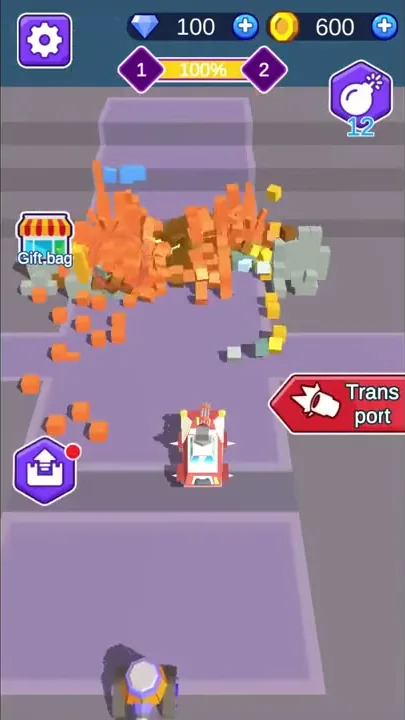
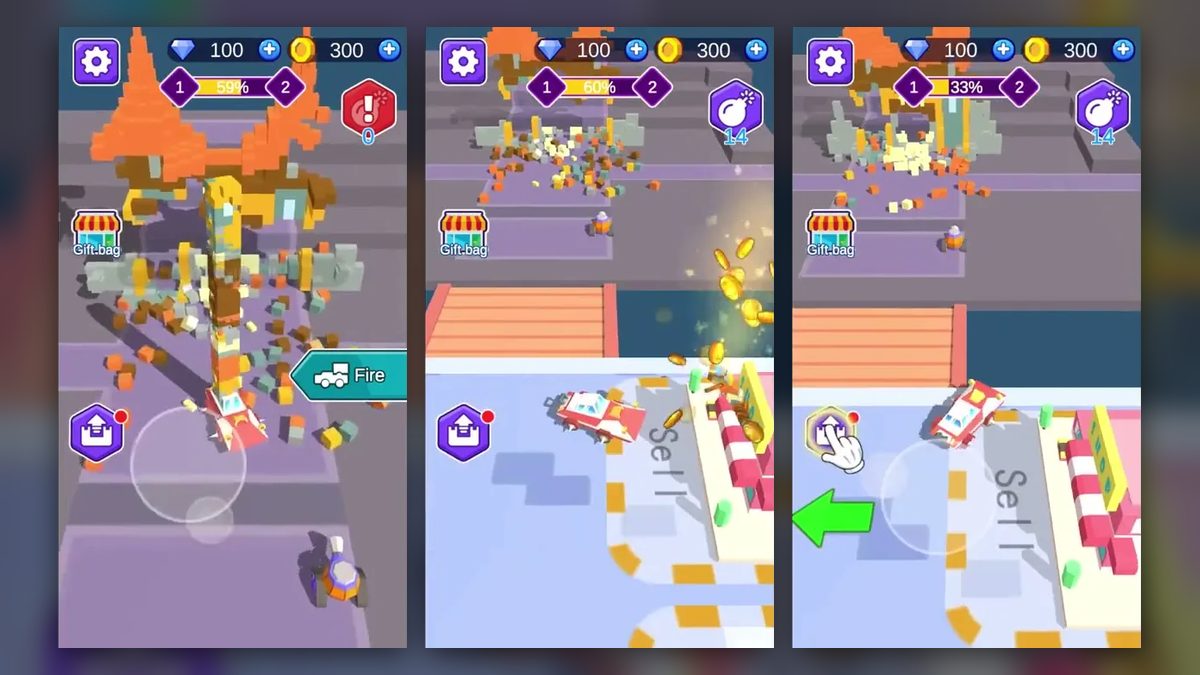
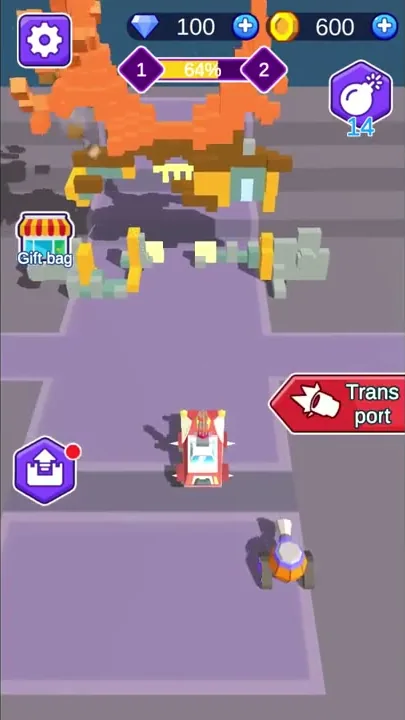
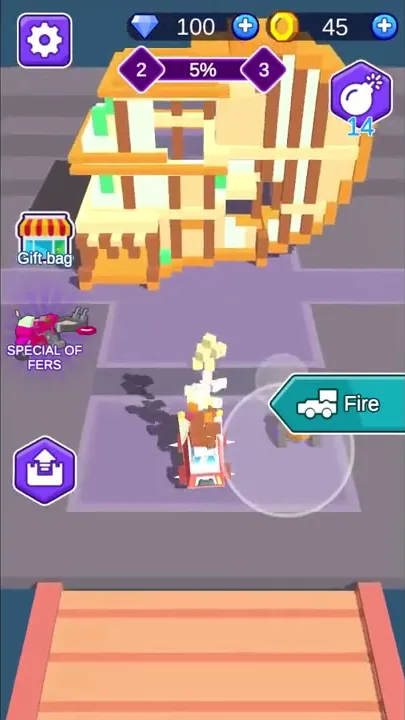
One button on the right switches the car between its two jobs. While the car sits on its pad firing, the button says “Trans port”; a tap frees the car to drive, and the label changes to “Fire”. In driving mode a translucent joystick circle appears under the finger, and the car goes wherever it is steered.
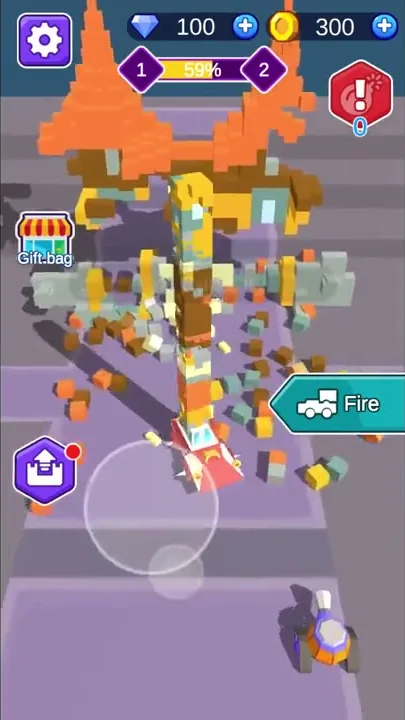
Play runs in a loop. The car shells the building from its pad until the floor is littered with cubes, then switches to transport and sweeps them up. Once the load is full it crosses the bridge to sell, the coins pile up for upgrades, and the car climbs back to its pad to fire again.
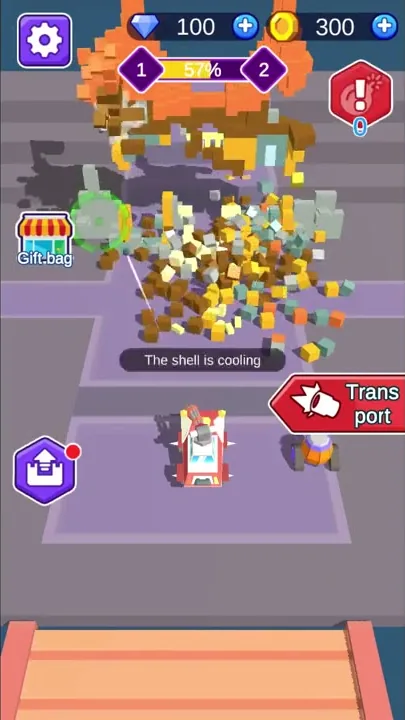
Firing belongs to the mortar, a gun turret on the car’s roof. From the pad it sends shells trailing white streaks toward a green target ring on the building. Every hit knocks cubes loose, and they scatter across the platform.
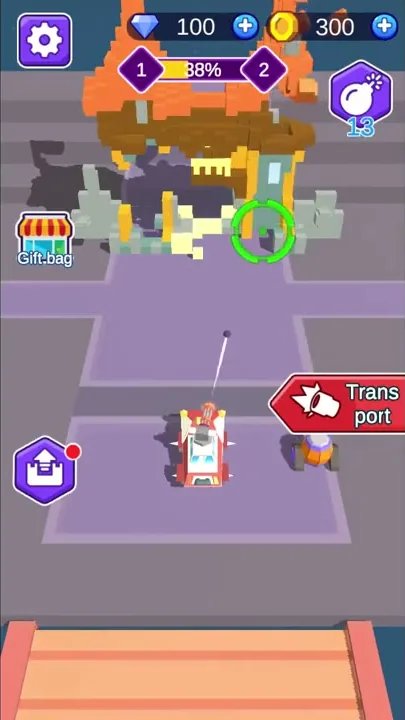
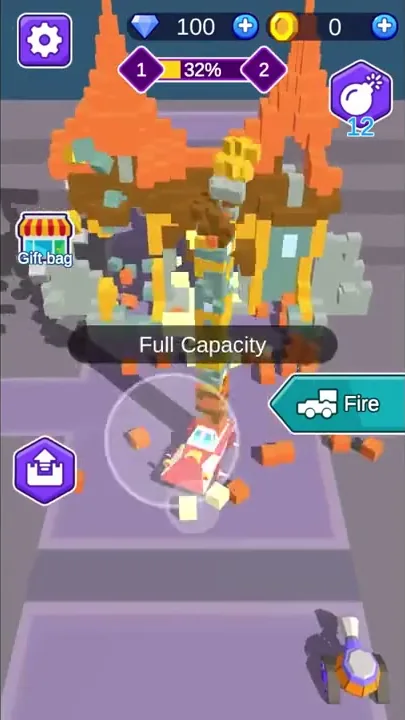
Shells are limited. A purple hex icon with a bomb in the top-right corner counts them down as they fly. Once they run out, it turns red with an exclamation mark and “The shell is cooling” appears in the middle of the screen. By the time the car had reached the shop with its next load, the supply was full again.
Transport mode turns the car into a collector. Each loose cube it drives over joins a column stacked on its roof, and the column keeps rising until “Full Capacity” appears and the car can hold no more. The stack bends as the car moves.
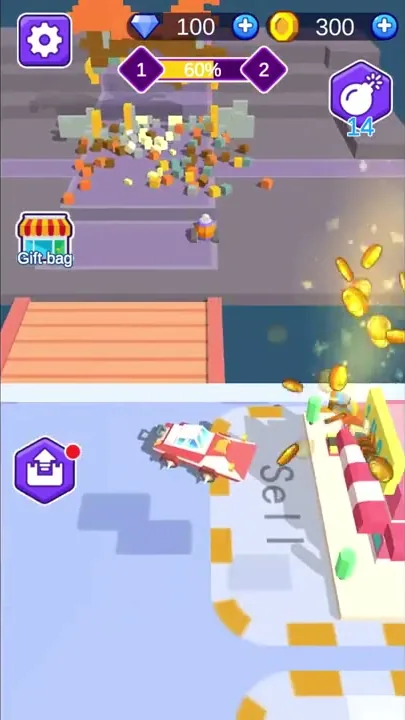
Behind the pad, a salmon-colored wooden bridge crosses dark blue water to a pale blue lot with “Sell” painted on the ground, beside a pink shop under a red-and-white striped awning. The camera follows the car down, and rolling onto the Sell zone sets off a burst of gold coins from the shop. The first three loads sold in Level 1 each paid 300 coins.
A small wheeled unit, orange and purple with a white top, keeps turning up around the map, from beside the car’s pad to the Sell area. Nothing on screen shows the player steering it.
A multi-story block of cream and orange cubes, framed by brown beams and dotted with green, fills the platform in Level 2. An opening barrage empties the shell supply and strews cubes across the lavender floor, and the car heads off with a full load. While it is down at the shop, a “Gain on this time” pop-up credits 310 coins, and by the time the car is back on its pad the shells have refilled.
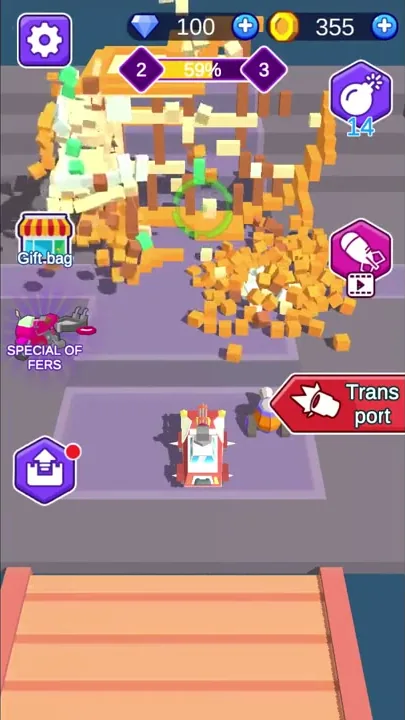
With the bar at 37%, a tutorial hand points at a new button on the right. Later, little more than brown posts stands behind a broad heap of cubes, and at 100% the whole building has come down. The car then carries a tall, bending column of its remains down to the shop.
That new button is a pink hex just below the shell counter. Once the tutorial hand has tapped it, the button shows a missile icon with a small film-strip symbol underneath.
A bigger building and the coin upgrades
Guidance is heaviest early in Level 1. A tutorial hand taps “Trans port” while the car is still firing. On the first drive down to Sell, a large green arrow on the ground points left while the hand taps the purple hex button at the lower left, which carries a red dot. Later trips to the shop show no arrow.
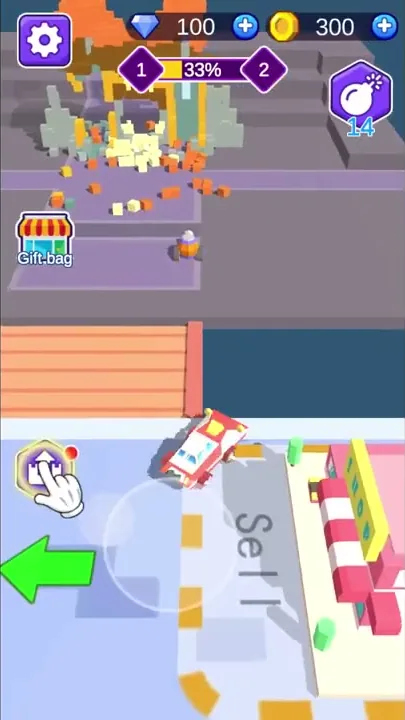
The second building is bigger than the first. Level 1’s house has an orange roof with two tall orange spires over yellow pillars, gray-green walls and light-blue windows, with a brown band running under the roof. After its collapse was hauled away, the bar switched to 2 and 3, and the new building stood in its place. Level 2 also adds two buttons: a special offers icon from the start and, partway through, the pink missile button.
Coins are the main currency, shown in the top-right corner with a “+” button. They come from loads sold at the shop and from the “Gain on this time” pop-up, and they pay for upgrades and cars.
That pop-up appeared twice: once after Level 1’s house came down, showing +295 under a pile of coins, and again partway through Level 2. Under the amount sit two buttons, each tagged with a red “x3”: a blue “3 times acquisition” button with a film-strip icon, and a yellow one showing a diamond and the number 5. A red diamond-shaped close button caps the panel’s upper-right corner, and afterward the coin total rose by exactly the amount shown.
Diamonds are the second currency, with their own “+” button at the top. Their total never moved, and the 5 on that yellow button is the only diamond price on screen.
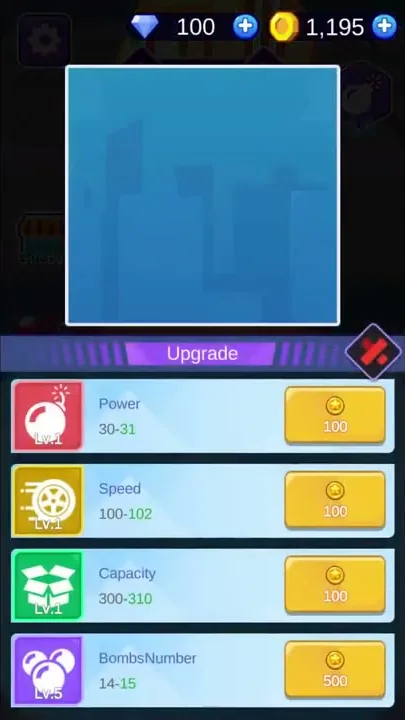
The Upgrade panel lists four stats, each with a level badge and a coin price beside the step from its current value to the next. Power sat at Lv.1, 30 to 31, for 100 coins; Speed at Lv.1, 100 to 102, for 100; Capacity at Lv.1, 300 to 310, for 100; and BombsNumber at Lv.5, 14 to 15, for 500. Once coins had been spent there, Power showed Lv.5, with its next step (34 to 35) priced at 350; Capacity sat at Lv.2 for 150, while the BombsNumber button showed a film-strip icon and “Free” in place of a price.
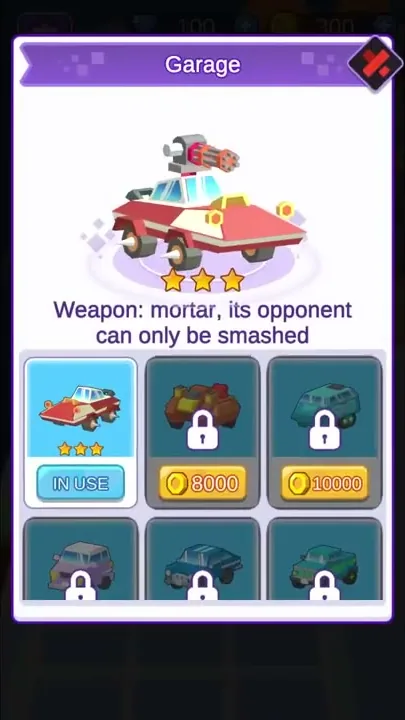
The Garage panel shows the current car with three stars and the line “Weapon: mortar, its opponent can only be smashed.” Below it, cars sit three to a row. The first is marked “IN USE” and the next two are locked at 8000 and 10000 coins, with a second row of locked cars beneath them.
Two more icons sit on the left edge of the screen. A shop with a striped awning labeled “Gift.bag” is there from the start, and from Level 2 on, a pink-and-gray vehicle labeled “SPECIAL OF FERS” sits just below it. The film-strip icon on “3 times acquisition” also turns up on the free BombsNumber upgrade and on the missile button, though no ad played at any point.
Common demolition, long-term upgrades
The management layer wrapped around the wrecking raises the game’s long-term playability a lot. Coins from every load feed the four stats in the Upgrade panel and the locked cars in the Garage. Early in Level 2, the panel already showed Power raised from Lv.1 to Lv.5.
Knocking down a building and picking up the debris is a look and animation that bite-sized games use very widely, and Building Damage is built on it. Shells punch cubes out of Level 1’s spired house until the lower floor stands on bare pillars, and the loose pieces end up stacked on the car’s roof.
Structurally, the game combines the walk-around management loop with a separate core. The shooting happens from a parked car, and the management half takes over once the cubes are loose and need hauling to the shop.
The missile button and other unexplained parts
We had no criticism of Building Damage.
The pink missile button’s effect stayed off screen. The small orange-and-purple unit rolls around near the car with no visible job. What the Power and Speed upgrades change on the car does not show either.
Gift.bag and SPECIAL OF FERS stayed closed, as did the “+” buttons beside the currencies, and the Garage’s second row keeps its prices out of view. No fail state appeared, and neither did a timer or a lives counter.
Shelling buildings and hauling cubes to the shop
Most of the time goes to two jobs. One is shelling a voxel building from a parked car and watching it shed cubes until it caves in; the other is sweeping the mess into a column on the roof and carting it across a bridge to the shop. A taste for chipping away at a structure lines up with the first, and a liking for collect-and-deliver runs lines up with the second.
Between hauls, the choices are about coins: which of the four stats to raise next, and whether to save toward a locked car priced in the thousands.
Verdict
Building Damage takes a staple of bite-sized games, knocking a structure apart and gathering up the pieces, and combines it with walk-around management. On its own, the demolition is a format that turns up in many games. The stat levels and the Garage’s locked cars wrapped around it give the game far more to work toward over the long run, and that pairing is what our take on it comes down to.